

API Introduction
Currently the api supports Cross Connect and Cloud Connect ordering. The documentation for Cross Connect ordering is under construction, in the meantime please consult the reference
Cloud Connect Basic concepts
REST APIs provide a powerful, secure and simple way to access all main functionalities offered by Interxion such as order new cloud service(s) or retrieving existing profile(s), cloud access, cloud offers, cloud services.
Below you will find an explanation of the main concepts you need to familiarize with in order to use the api:
- What is Cloud Connect? - Consists of two components: A “Virtual Circuit”, or VLAN, between a Customer and the desired Cloud Service Provider (CSP) and a Cross Connect to the Cloud Connect platform in order to build an end-to-end connection as shown in the image below. Once a Cross Connect is made to the Cloud Connect platform one or more VLANs may be created in a One-to-Many aspect allowing a single physical connection to support multiple VLANs.
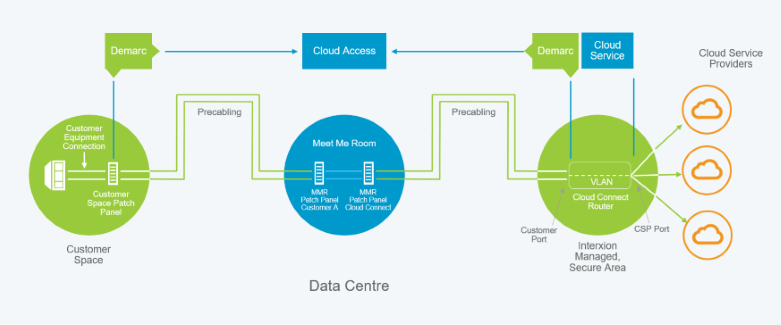
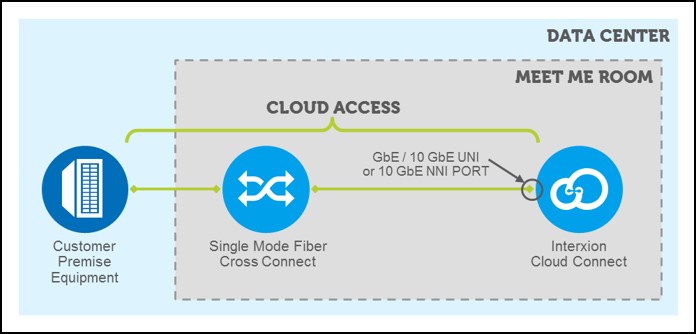
- What is Cloud Access? – Cloud Access is the connectivity component to the Cloud Connect Platform and consists of a Cross Connect to the Cloud Connect Platform and a UNI or NNI Port. Each Cloud Access is ordered and managed separately and is required to order Cloud Service(s).
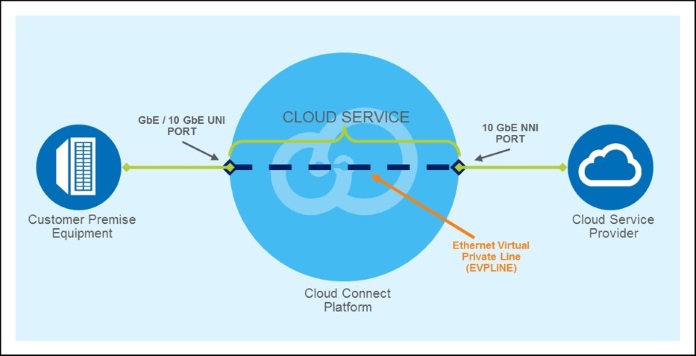
- What is Cloud Service? - Cloud Service is the VLAN between a UNI (Subscriber) and a NNI (Services) port on the Cloud Connect platform.
User - Credential used to login into Interxion Customer Portal and public API
Profile - Profile is a permission granted by your Change list Authoriser in your organisation, as this will determine what services and assets you are authorised for.
Offer – A connectivity product offered by a Cloud Service Provider (Express Route, AWS Direct Connect)
- Redundant set up: A redundant setup requires that you have 2 Cloud Access ports
- Non Redundant set up: For Non Redundant you will need 1 Cloud Access Ports (You will need to know this before you can connect to any of the Cloud service providers that your business wishes to use.You will also need to decide between the configuration you wish to use in terms of a redundant setup or a non-redududant setup)
Order – Order for one or more Cloud Service(s)/Cloud Access(es). This feature allows to purchase any of the Cloud Services in the increments depicted by the Cloud Service Provider.
Assumptions
In order to use the Interxion API you need to be familiar with concepts of:
Quick start
Prerequisites
Valid Portal Credentials
Consist of Email Address and Password. Contact your Company's change list authoriser who can create your account for you.
Make sure your application is registered with Interxion
This is mandatory, please ensure you have your Client Id, Client Secret and the list of Scopes as you will not be able to query REST APIs.
- Client Id - an unique identifier for your application
- Client Secret - a password used to authenticate with the API
- Scopes - are identifiers for resources that the client wants to access
Please Raise a support ticket via Portal.
Please select Request type "General & Product Enquiries".
Authentication
To retrieve your access token, use this code:
curl https://login.interxion.com/connect/token
  -X POST
  -d "grant_type=password&username={Email}&password={Password}&client_id={ClientId}&client_secret={ClientSecret}&scope={Scope}"
$url = "https://login.interxion.com/connect/token"
$body = "grant_type=password"
$body += "&username={Email}"
$body += "&password={Password}"
$body += "&client_id={ClientId}"
$body += "&client_secret={ClientSecret}"
$body += "&scope={Scope}"
$response = Invoke-RestMethod -Uri $url -Method Post -Body $body
$token = $response.access_token
Make sure to replace the fields in with your actual values.
The above command returns a JSON-structured response like this:
{
    "access_token": "eyJ0eXAiOiJKV1QiLCJhbGciOiJSUzI1NiIsIng1dCI6InhUQWdUTGtuSEc4Z2ZzcldhN2U0czRBN1hycyIsImtpZCI6InhUQWdUTGtuSEc4Z2ZzcldhN2U0czRBN1hycyJ9.eyJpc3MiOiJodHRwczovL2xvZ2luLWQxLmludGVyeGlvbi5jb20iLCJhdWQiOiJodHRwczovL2xvZ2luLWQxLmludGVyeGlvbi5jb20vcmVzb3VyY2VzIiwiZXhwIjoxNTA0NzA1MTAwLCJuYmYiOjE1MDQ3MDE1MDAsImNsaWVudF9pZCI6InN3YWdnZXIiLCJzY29wZSI6InJlc291cmNlLmFwaSIsInN1YiI6InBvcnRhbHRlc3RpbmdAaW50ZXJ4aW9uLmNvbSIsImF1dGhfdGltZSI6MTUwNDcwMDk5NSwiaWRwIjoiaWRzcnYiLCJwcmVmZXJyZWRfdXNlcm5hbWUiOiJwb3J0YWx0ZXN0aW5nQGludGVyeGlvbi5jb20iLCJlbWFpbCI6InBvcnRhbHRlc3RpbmdAaW50ZXJ4aW9uLmNvbSIsInJvbGUiOlsiQ1JNVXNlcnMiLCJTZWdtZW50X0kgd29yayBpbiBjbG91ZCBjb21wdXRpbmciXSwiYW1yIjpbInBhc3N3b3JkIl19.knbCZVN8NlTsg4yCMhudX20hsUAWA32mQIS5NXgqhEK4sUIsiSeueqLyyL1rT0zxoGMYHtpTb_FEfb9dkJpP18A5T97XYf0wffLbYDTbrVYmxqUVgl6clYwdZXVGbcB6PxX6drgF5EmruxOkK0Bfb8kE_inzTvqTSWMJyVNh0vw1jJjShBGwdGli4UnWnhxap7obWhr8Y8x6IJIkhAOZmRNXlc471yd9bGnA2Hrobm2M1WCxKTa325dUM1bDxYJ2ccPnqrbt0WPiWkvu_ZMgJG36qNu3eprvdwFy9KHgqlHm4HncE0wX80QfrJQEuTERegxBdzR3i-ZO6rJSepiYu_2F7r9tamaEwdtaFL1yFCOvN0EEeAUgqWNKXINp8YSuYoAGeUd1i_lBG5aYYGgxs7VJrqgpBMVYc859xjA6c-rHstuFI86v49kBUfVGa_8cLiWhacMEnKn_4m2qA25kbuyCET1h-jRQ09mEsM9ks344-18A8BngWgJFPCtoDhEb110pmnslmClw0QwXndvtVYSyzlYtc07kaY5jw-gLfHN11B-9UcaX7K1LhbIENidPfRpf_vWLbQMum0caY5z4KKKAH2TjHOKOb1IsVJHenYBV6jXnWSeGG1xYQxiyK5gbWcjEVQIi6NiOQ7OunynqMxnppwfM-pHjQ8iaruvs1MM",
    "expires_in": 3600,
    "token_type": "Bearer"
}
Our API operates using OpenID Connect and OAuth 2.0 for authentication and authorization.
Before making requests to our API resources, you must first authenticate in order to retrieve a bearer token.
Include this bearer token in API requests in the Authorization header with the Bearer authentication scheme.
In order to obtain a bearer token, you will need the following:
- Login Credentials
- E-Mail Address
- Password
- Client ID
- Client Secret
- Scope
A POST request can then be made to our token endpoint:
https://login.interxion.com/connect/token
Further resources on OpenID Connect & OAuth 2.0:
Walkthrough: Retrieve your profile
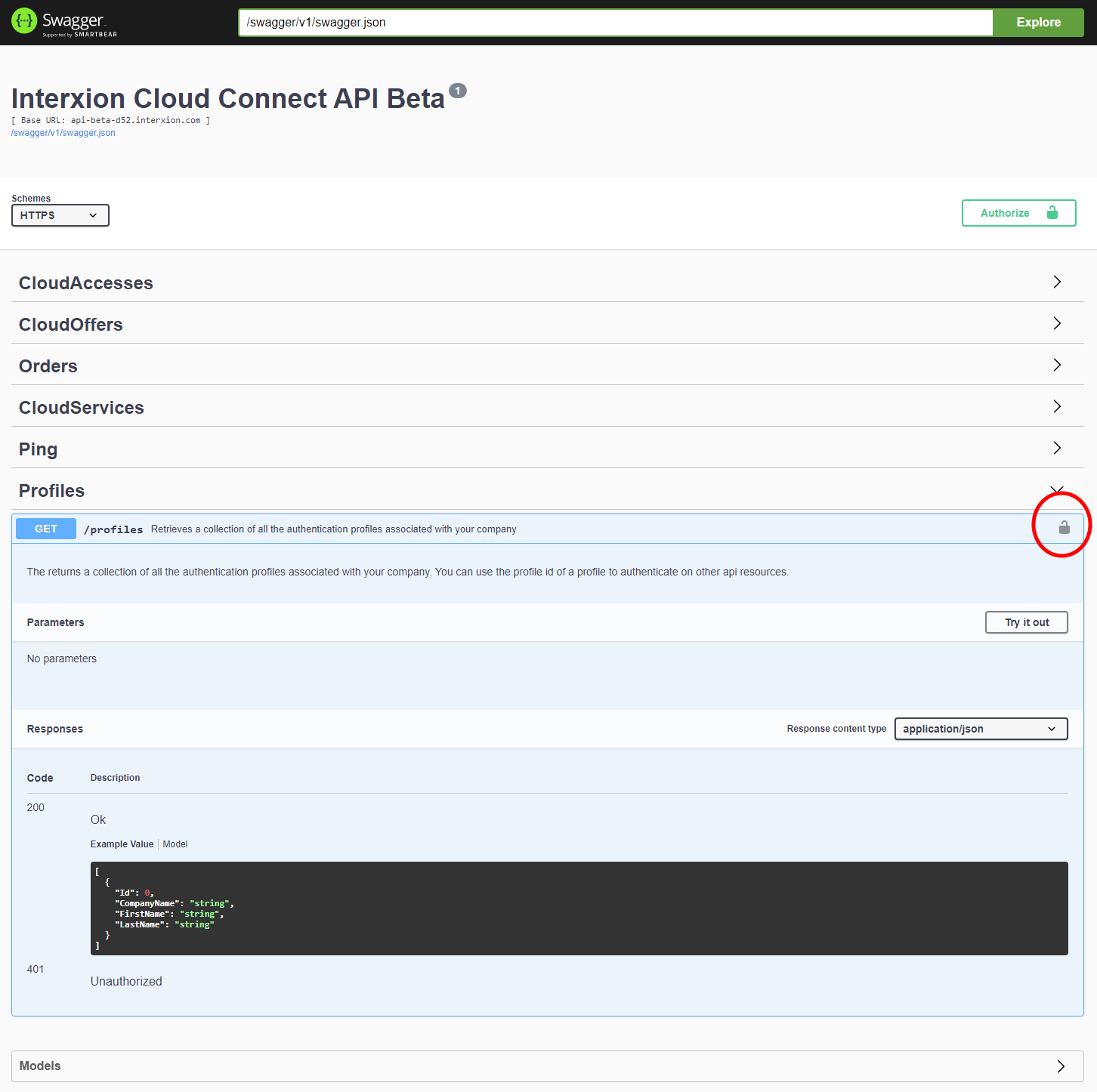
All api calls will require your ProfileId passed in as a parameter, following you'll find a step-by-step explanation about how to retrieve your profile info using the Swagger documentation.
Alternatively you can retrive it calling the Profiles api.
- Please open swagger landing page
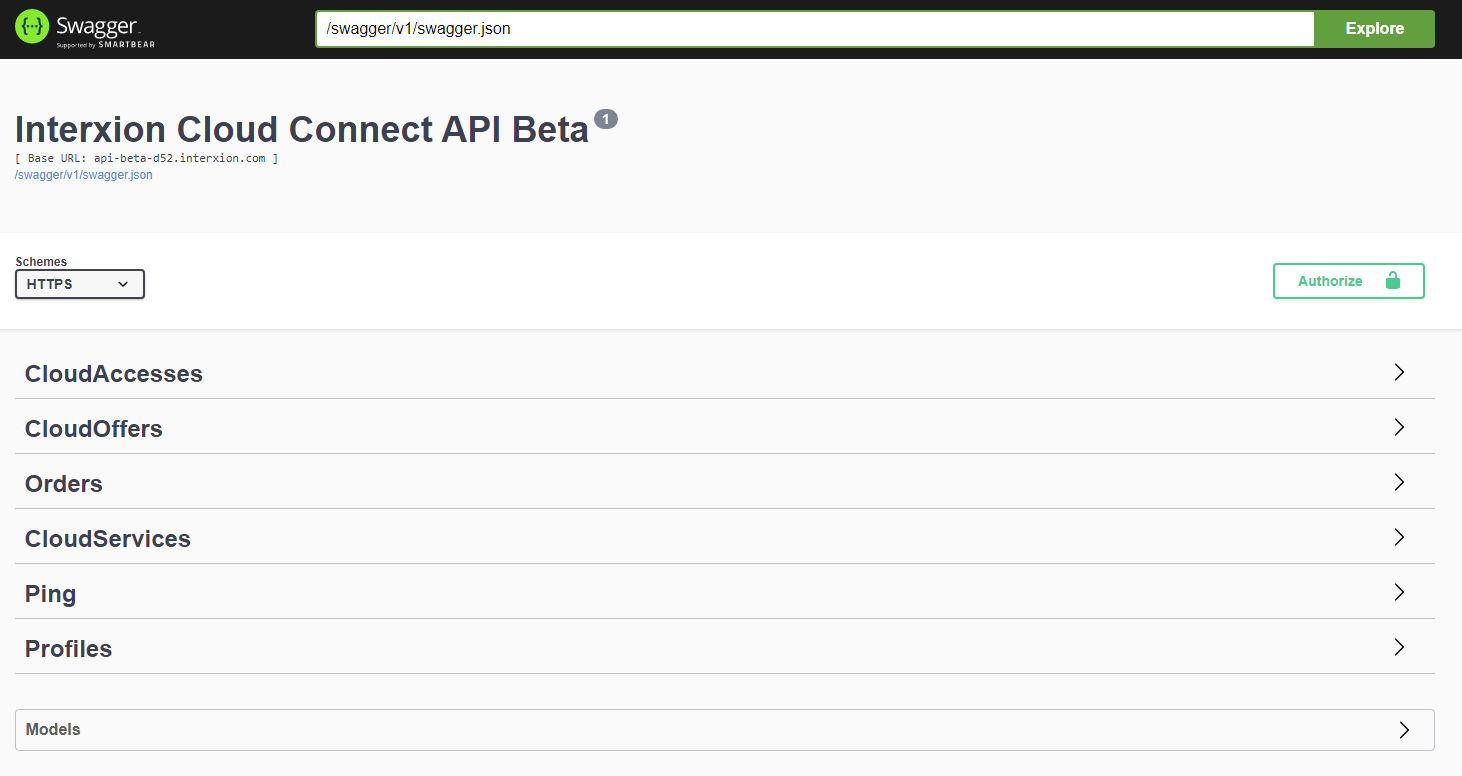
- Go to Profile endpoint click on it and Click on "GET" to expand the view.
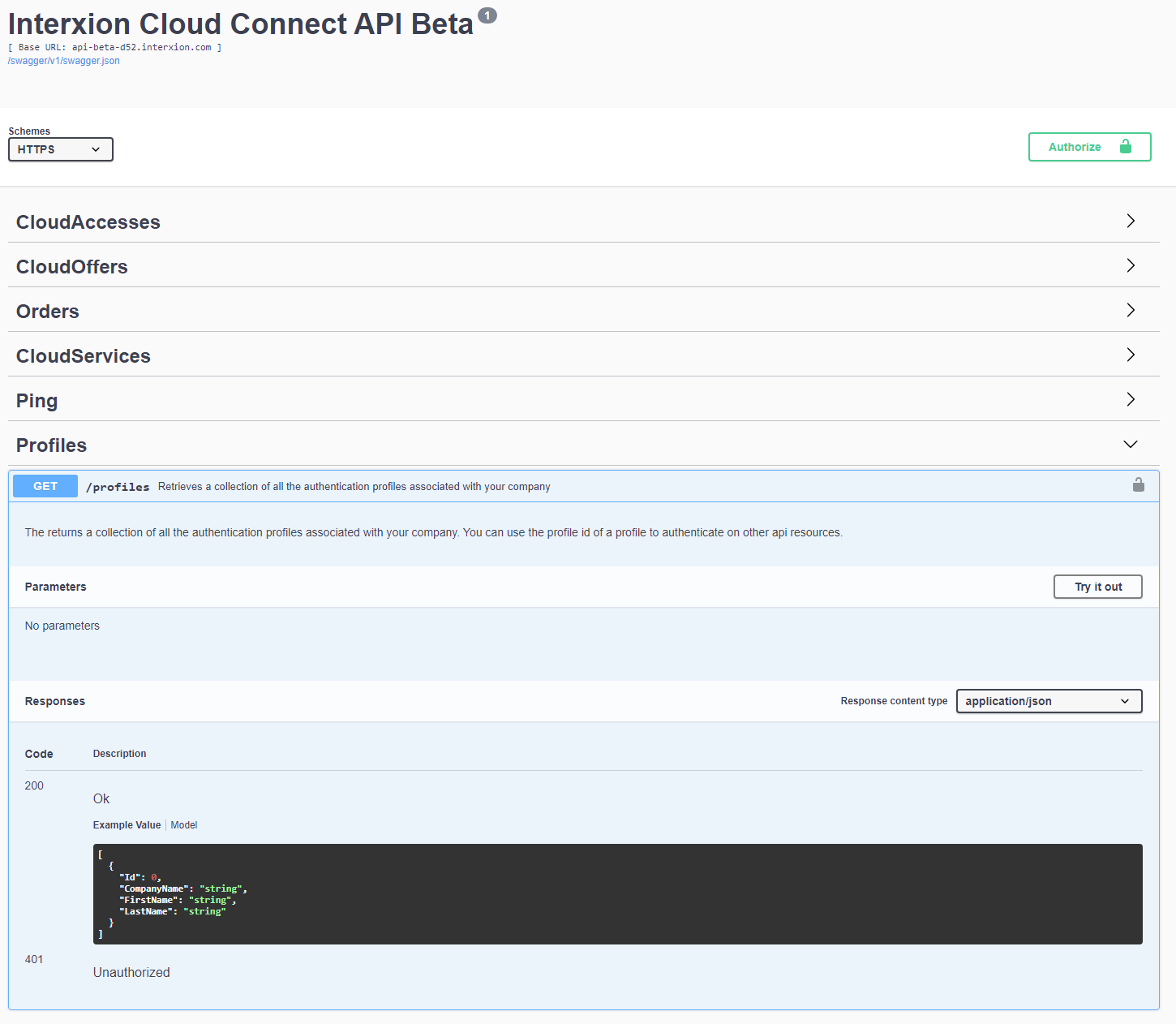
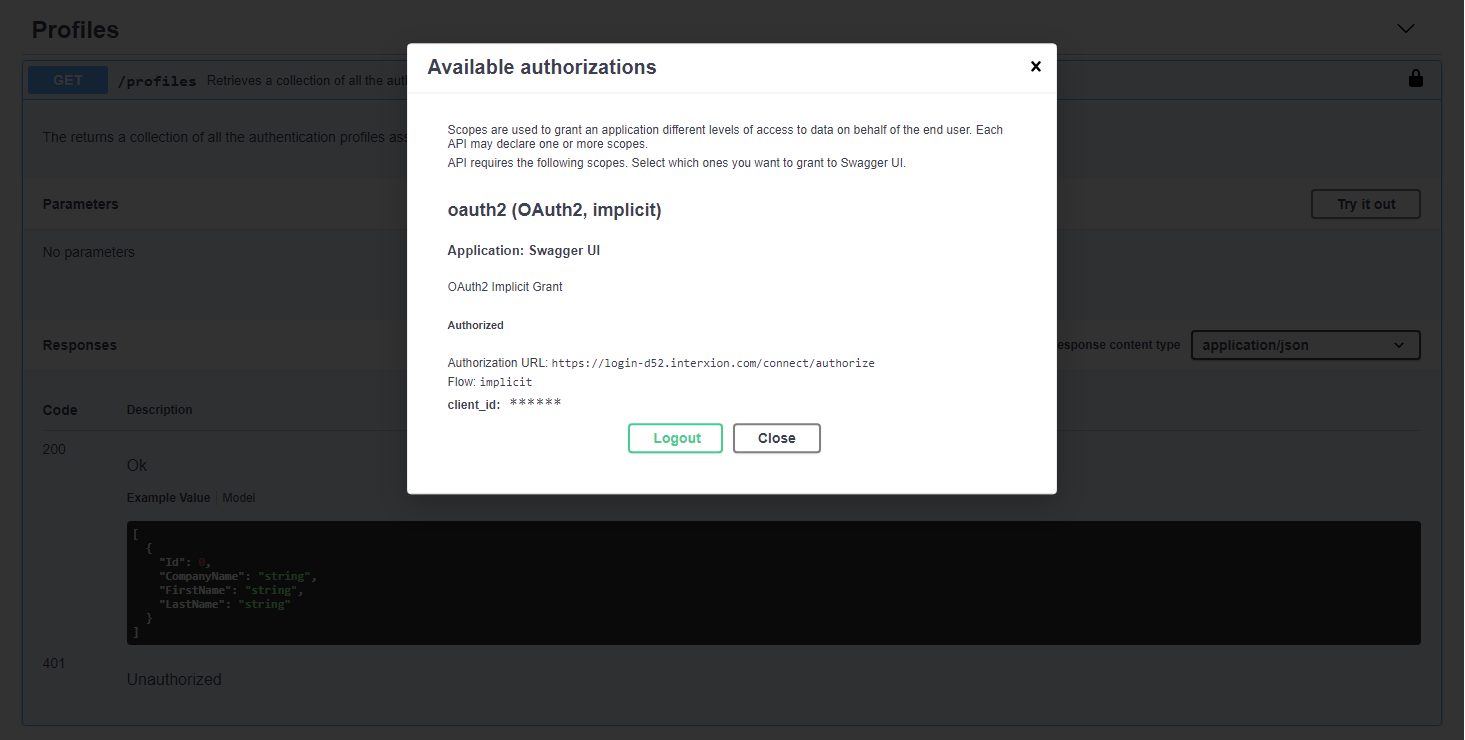
- Click on the icon on the right side of the screen as circled in the image below.
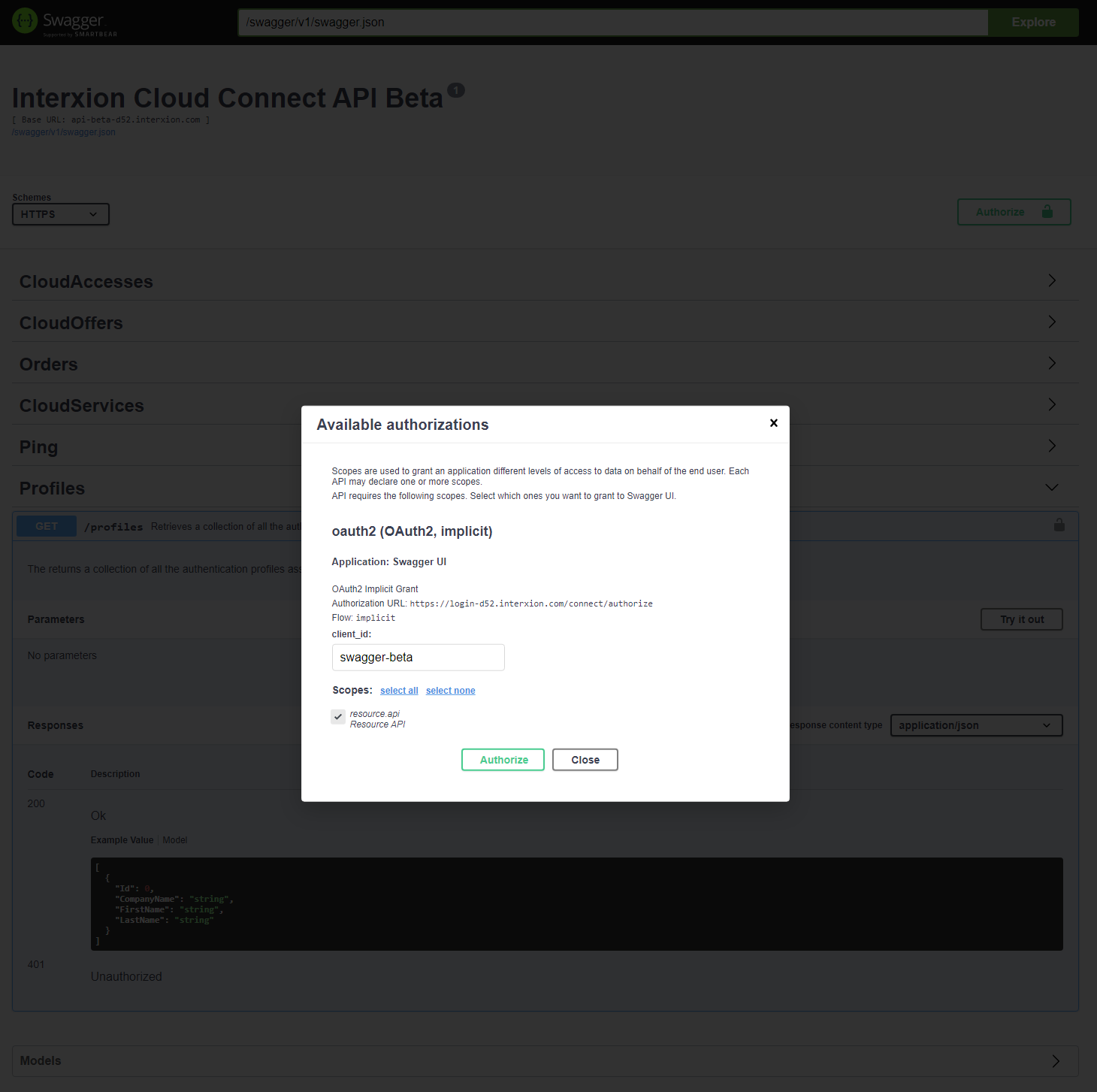
- Select the check box ‘resource.api’ on ‘Available authorizations’ window.
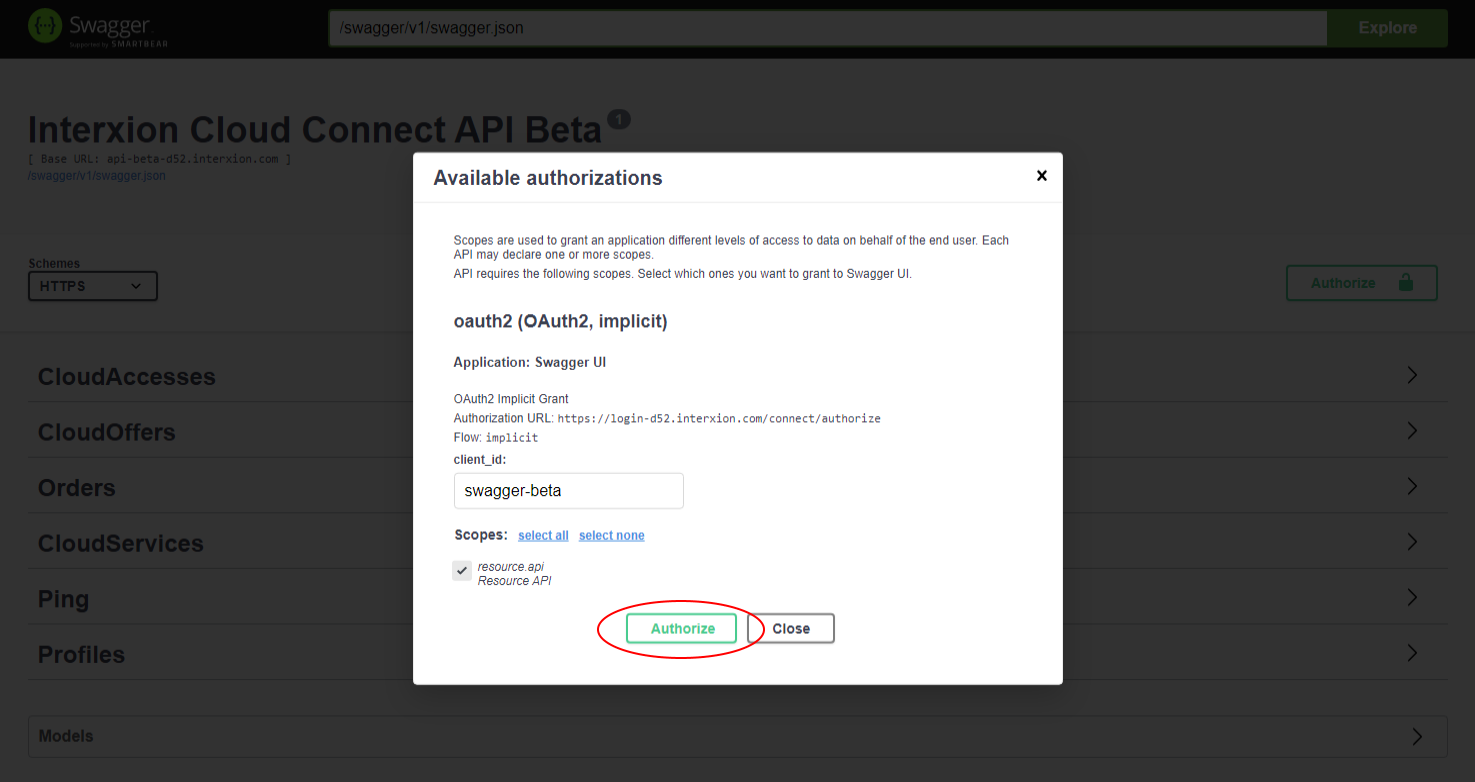
- Click on ‘Authorize’ button. A new tab/page will open, redirecting to SSO login page.
- Redirecting to SSO login page.
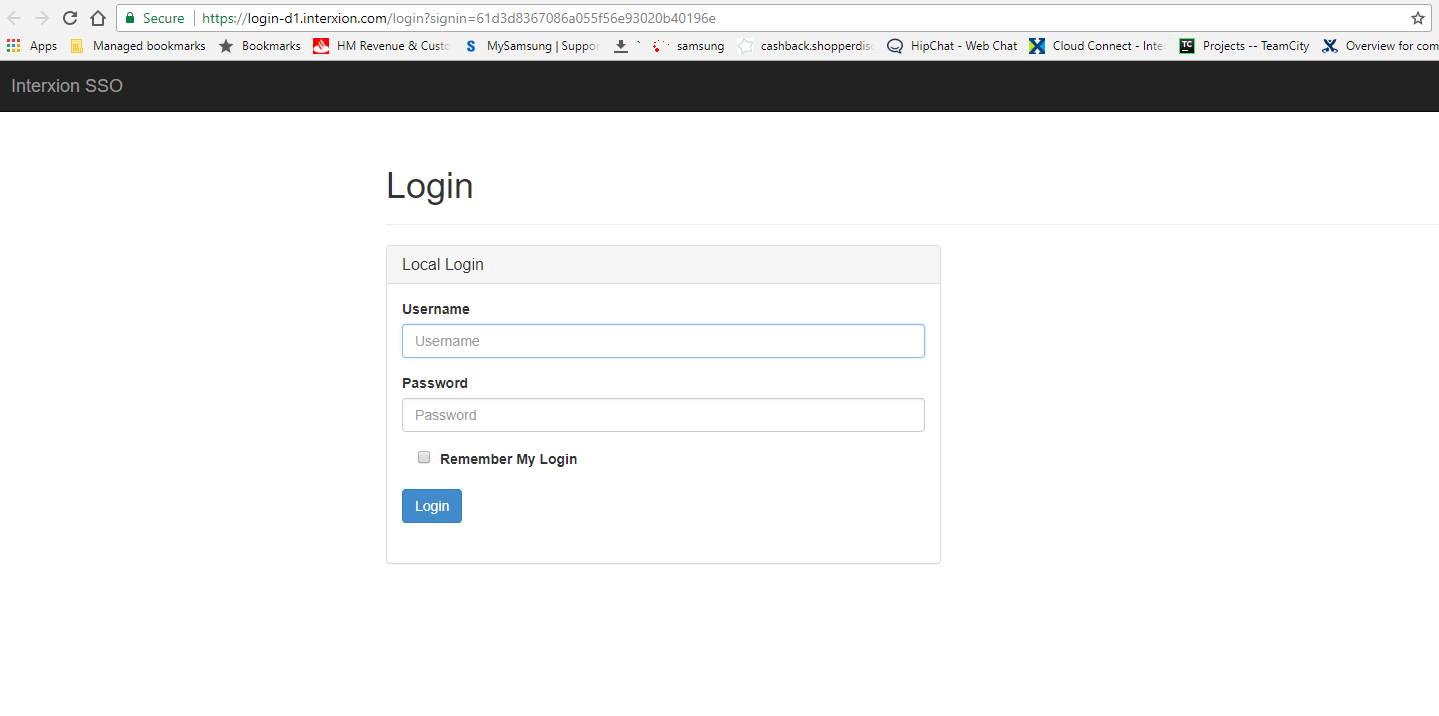
- Enter your Portal username and password and click on Login button. The Interxion SSO page will redirect back to the Swagger page if the credentials are correct.
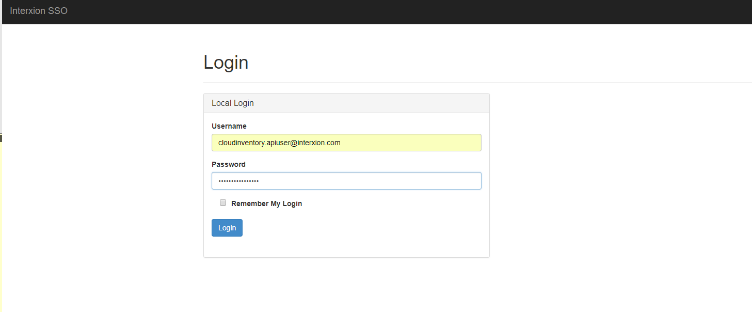
- Returning to Swagger.
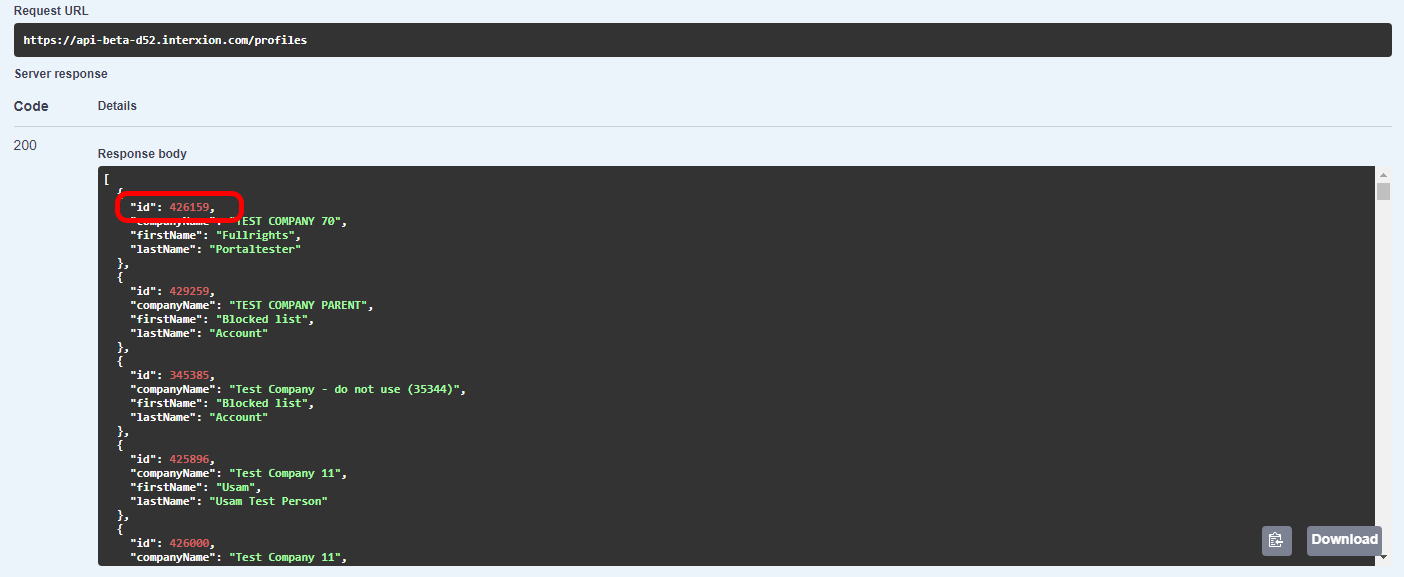
- Click on ‘Try it out’ button to get Profile ID.
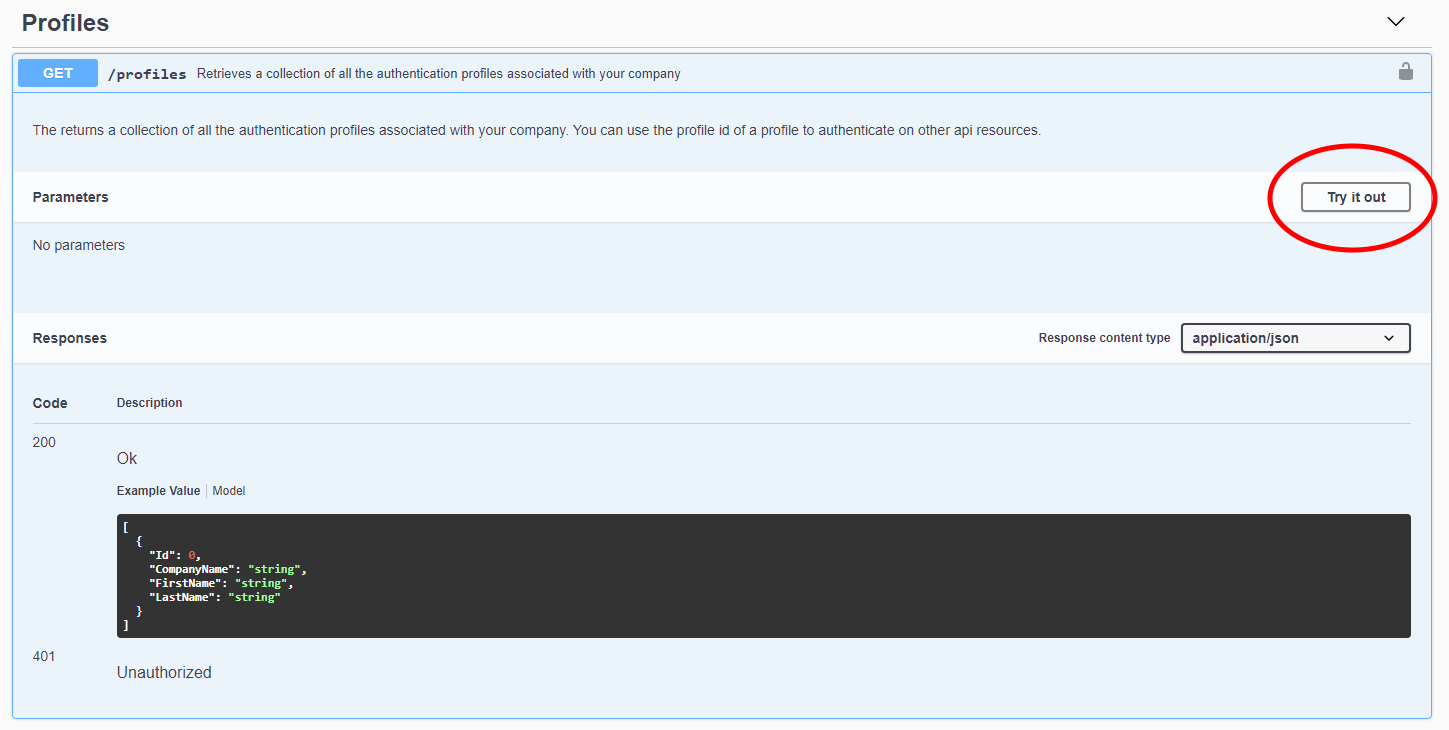
- The API will return as many records as the number of profiles associated with the registered email address. In the response body section, get the Profile id of interest, identified by the variable
idas per below given screenshot.
How to
Prerequisites for ordering a Cloud Service
In order to create a new Cloud Service we first need to create a new Cloud Access.
At the moment the only way to order a new Cloud Access is via Portal.
Please note you may already have existing Cloud Access ports, please check via the Portal.
You can have a look at the first part of the following video for a step by step guide about how to order a new Cloud Access with Portal
Ordering AWS Services via Intexion's Customer Portal
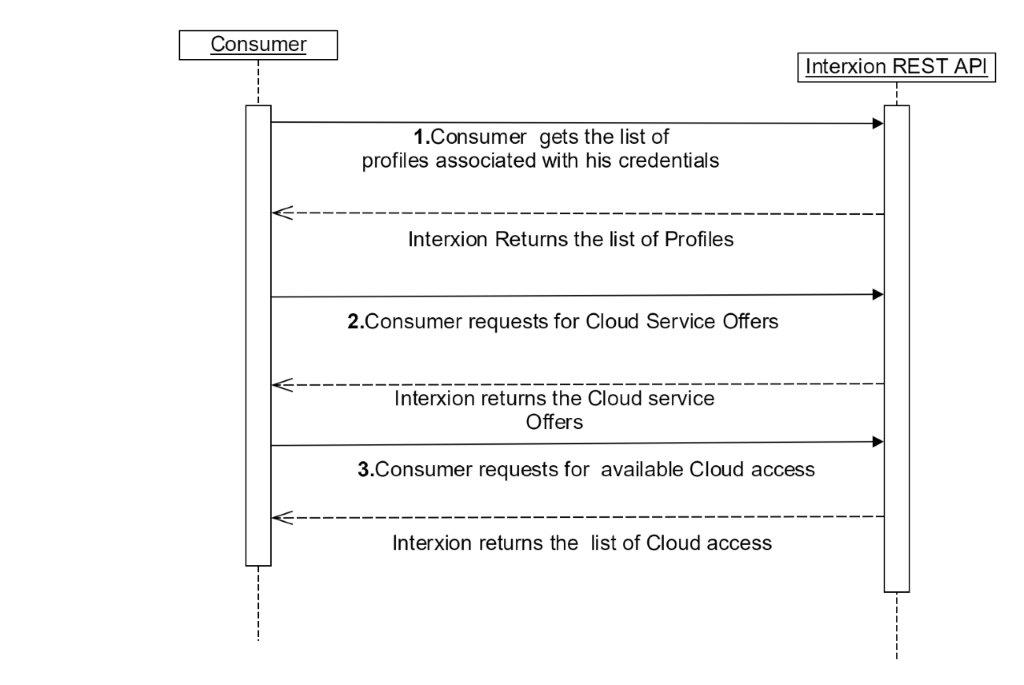
Go through the Quick start guide to authenticate and get your profile id
Get cloud service provider id, cloud provider offer id and edge node id. The collection returned lists cloud offers from which you can determine the infomation required for ordering a cloud service.
Order a Cloud Service
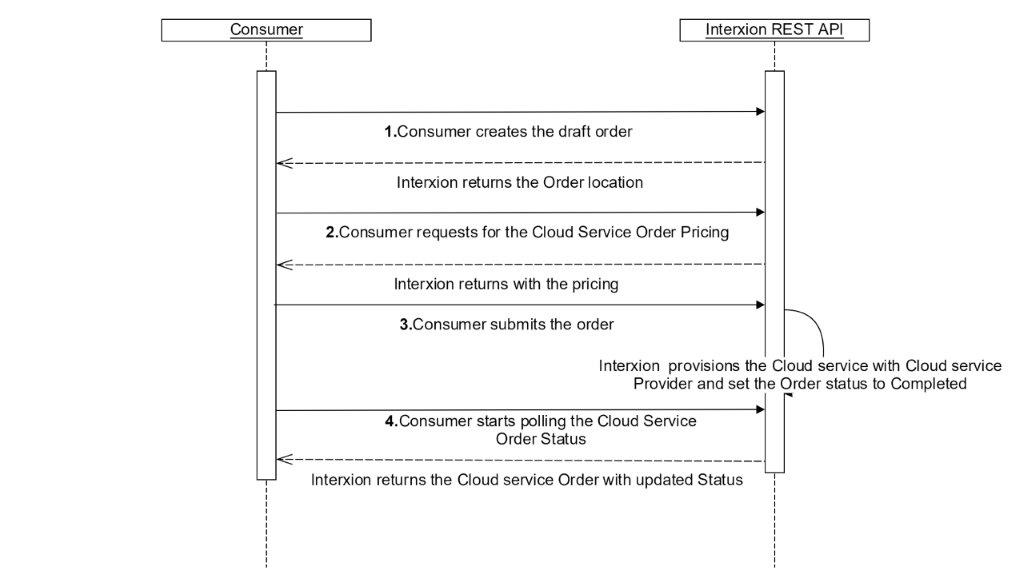
Create a new draft order. With this action the order will be stored in our database in a draft state and ready to be provsioned. We are currently supporting two Cloud Service Providers Express Route and Aws
Retrieve the order price. Check the price associated with this order.
Submit the order for provisioning. The order will be submitted for provisioning with the choosen cloud service provider.
Start polling on the order and check the order status. When the provisioning process is completed succesfully the order status will change to
Completed.
References
Profiles
curl -X GET --header 'Accept: application/json' --header 'Authorization: Bearer eyJ0eXAiOiJKV1QiLCJhbGciOiJSUzI1NiIsIng1dCI6InhUQWdUTGtuSEc4Z2ZzcldhN2U0czRBN1hycyIsImtpZCI6InhUQWdUTGtuSEc4Z2ZzcldhN2U0czRBN1hycyJ9.eyJpc3MiOiJodHRwczovL2xvZ2luLWQxLmludGVyeGlvbi5jb20iLCJhdWQiOiJodHRwczovL2xvZ2luLWQxLmludGVyeGlvbi5jb20vcmVzb3VyY2VzIiwiZXhwIjoxNTA0NjM0MjU3LCJuYmYiOjE1MDQ2MzA2NTcsImNsaWVudF9pZCI6InN3YWdnZXIiLCJzY29wZSI6InJlc291cmNlLmFwaSIsInN1YiI6InBvcnRhbHRlc3RpbmdAaW50ZXJ4aW9uLmNvbSIsImF1dGhfdGltZSI6MTUwNDYzMDYzOSwiaWRwIjoiaWRzcnYiLCJwcmVmZXJyZWRfdXNlcm5hbWUiOiJwb3J0YWx0ZXN0aW5nQGludGVyeGlvbi5jb20iLCJlbWFpbCI6InBvcnRhbHRlc3RpbmdAaW50ZXJ4aW9uLmNvbSIsInJvbGUiOlsiQ1JNVXNlcnMiLCJTZWdtZW50X0kgd29yayBpbiBjbG91ZCBjb21wdXRpbmciXSwiYW1yIjpbInBhc3N3b3JkIl19.YMyXduOIdU-AVXE9WYaaia0SjFbO6IZhh8nQW-VEI0CAMznefI10SHvq50wOqFA5_6vXZ96b3VDeYmEdh5EkzZWFSRtm18by0jYPII94trJ_i4yJNoxYg-EEbNvSIgLAtz3GBbiPz3qxpCpSddKdU73_atOizEZvu0LXVtL9mynJFk0_noCkozEC2Oa5ye3zR8scqK6XMx6K3b8Sz7fQx6mA7a12ofK20DKcyRlAvuuWTJSWrFKhzMGwCFYWnDYHq-SyqIfXzrM6LERTKyv0GPq_4errdSUf0wtTWAHrPDocFEEgS6EGiW6y9ge4IjYzCFIGetCra_1WYVYCiGM0pQiGyPy-GK5-94g8It4ZyO4Wet0WcJ_egZRqlSUP77inVhVjYjcZbPUBJEaamZchx3DM3JFC8Om6FqCcU2Tu76CSX2LrRwkS9b9l3Yw1NIgqiGh7AR4zsSVpBiV5jsAQ8rVRuoGPIXYDpuc_Yvt9WZRjyixkgMhDuxMxF-bilF9QAUF-l9cwqCrxCcmP-8m3EM9a8K_W0TR-L19vTqO3_rwKOsVdEeol20MJW7znX5TCzVdHY-YxPDCFcRSYAXHNt7Ha__qnYJR-cCEJbKc_hkIDjIAGzjJQVxuAc7SA-kKE47ZcuYpsonz2FsU1K6Cba4WxXz2O0BJW1_zhwdyLrLI' 'https://api-beta.interxion.com/profiles'
 $hdrs = @{}
   $hdrs.Add("Authorization","Bearer eyJ0eXAiOiJKV1QiLCJhbGciOiJSUzI1NiIsIng1dCI6InhUQWdUTGtuSEc4Z2ZzcldhN2U0czRBN1hycyIsImtpZCI6InhUQWdUTGtuSEc4Z2ZzcldhN2U0czRBN1hycyJ9.eyJpc3MiOiJodHRwczovL2xvZ2luLWQxLmludGVyeGlvbi5jb20iLCJhdWQiOiJodHRwczovL2xvZ2luLWQxLmludGVyeGlvbi5jb20vcmVzb3VyY2VzIiwiZXhwIjoxNTA0NzkyMzczLCJuYmYiOjE1MDQ3ODg3NzMsImNsaWVudF9pZCI6InN3YWdnZXItYmV0YSIsInNjb3BlIjoicmVzb3VyY2UuYXBpIiwic3ViIjoiY2xvdWRpbnZlbnRvcnkuYXBpdXNlckBpbnRlcnhpb24uY29tIiwiYXV0aF90aW1lIjoxNTA0NzgwMjY1LCJpZHAiOiJpZHNydiIsInByZWZlcnJlZF91c2VybmFtZSI6ImNsb3VkaW52ZW50b3J5LmFwaXVzZXJAaW50ZXJ4aW9uLmNvbSIsImVtYWlsIjoiY2xvdWRpbnZlbnRvcnkuYXBpdXNlckBpbnRlcnhpb24uY29tIiwicm9sZSI6IkNSTVVzZXJzIiwiYW1yIjpbInBhc3N3b3JkIl19.cuPWXHpYUKm2wUAzchwLGlsdb5DbywW06f_wDrzRtU0IT1QwOueNaFlIZqm0eAXrqwtgTqAuwlKA4Y3eBo17DGKdZlsFxXguvxENlNDl27p0U2Rq8c_RTYfP37yIob2tMDr9CbVkkA4nL50BAIPL5dRkBKD_MNXFSGtHr0rPduAkcNvHKdV5Zwaxz8d--AS-86uO1kBECPSwhxUFe2ZZGQZdeua6ec9-Sp8OGXrXn39EjJRKwAAKc5iLimj2TM4JNXiZSlDwR6bs76xlayB4EBKPpjxfVfZfZaOU4RoHLtRNWJdiAq4BZNjQIg2lHO9AcL4fnFSgfN1uTKSmkgPBwUCxI3gftGHedqmfNpO_Haj2Hgb1XBPHhGtWfwDYD_zWFYRwd2jsO1Ax5u0ATYDDphuWonYiXNVuNpYaYKH143NGmfLJksS54B1OvaoYz8Kv75O_yedDA4_ccxbwBCx4ILIE8o8QAkXKumhUcenUc90yU6x_eRS29DvnpA-4IrmjOn0LdloZuNEJoHnjPnT4ul3tUPydRUJvzDBR4mDqyZ4Yib5uEokhbtjx5zymuuaJGaKmzBq5XGiIf1M1X7ULEzm1Vs1hkvj2c9rf-tKAD9x7cyBiPu10H8kScDRY9yc9xzReAMd_ubm_L-Z8WZKaJdxGGdNc-dn5Q_PN8x8koms")
$url="https://api-beta.interxion.com/profiles"
$response = Invoke-RestMethod -Uri $url -Headers $hdrs
$response| ConvertTo-Json
The above command returns a JSON-structured response like this:
[
  {
    "Id": 295833,
    "CompanyName": "Test Company 21",
    "FirstName": "Permanent",
    "LastName": "Access"
  },
  {
    "Id": 295836,
    "CompanyName": "Test Company 21",
    "FirstName": "LOCATION SPECIFIC",
    "LastName": "ACCESS AUTHORIZER"
  }
]
This endpoint returns a list of all the authentication profiles associated with your company.
HTTP Request
GET https://api-beta.interxion.com/profiles
Swagger Documentation
Cloud Offers
curl -X GET --header 'Accept: application/json' --header 'Authorization: Bearer eyJ0eXAiOiJKV1QiLCJhbGciOiJSUzI1NiIsIng1dCI6InhUQWdUTGtuSEc4Z2ZzcldhN2U0czRBN1hycyIsImtpZCI6InhUQWdUTGtuSEc4Z2ZzcldhN2U0czRBN1hycyJ9.eyJpc3MiOiJodHRwczovL2xvZ2luLWQxLmludGVyeGlvbi5jb20iLCJhdWQiOiJodHRwczovL2xvZ2luLWQxLmludGVyeGlvbi5jb20vcmVzb3VyY2VzIiwiZXhwIjoxNTA0NzgzODY1LCJuYmYiOjE1MDQ3ODAyNjUsImNsaWVudF9pZCI6InN3YWdnZXItYmV0YSIsInNjb3BlIjoicmVzb3VyY2UuYXBpIiwic3ViIjoiY2xvdWRpbnZlbnRvcnkuYXBpdXNlckBpbnRlcnhpb24uY29tIiwiYXV0aF90aW1lIjoxNTA0NzgwMjY1LCJpZHAiOiJpZHNydiIsInByZWZlcnJlZF91c2VybmFtZSI6ImNsb3VkaW52ZW50b3J5LmFwaXVzZXJAaW50ZXJ4aW9uLmNvbSIsImVtYWlsIjoiY2xvdWRpbnZlbnRvcnkuYXBpdXNlckBpbnRlcnhpb24uY29tIiwicm9sZSI6IkNSTVVzZXJzIiwiYW1yIjpbInBhc3N3b3JkIl19.TuMUShsd14L7BrVdYF_f_AU-Q1fokjxPs9UtfO72_ZCR62ZlrL60chJ4fDpXGktDfmcMZXFQDufDe9H2iQYehdKEfpmX1aOS3jZPTmCYXR4Apb7Ec4lEJptQRzNFVQ4FiwwiBrMJsYV87NlWk_kRPTR3HSLoqzcxALf7_2mWB_9-VU-26NhHJS9DIZmB2OJKEOwt-MAPwgl5jFBGyvOdRcS9sz5DtCfnPRM53AqTHFePClCmYOCZyUQ7ZTnFYXKsK_-wTSKcVJ3v3A1TvdT8VIUK8FhqXVnN4FQA69yEf4e8dKnHA9F-Uz7qJcTBCTP-2n2bnqkrghHR4jvEMU58YR843p-_w_MiFi0zbQnG9DeF3-HnV10CjRatPC_yR_5zRFqMqKfbt7Yylho91TF_4u5pUCNwE3WfsuRjkK-kgHvY3u3BF4oUiubF8d_t7Fo0vyUamz0YB983Kb2mxU1410pYJI2cuY7eupnt_FHqmer2NnIonU90i_XiSQzoMESYhHvbeHBl9dfn16NEeynFfrVlHaO21-_GgATgHX-6a0rscP_bBQgSk9SRBTFJQA7xG9UmV1-3KDfHIypY_OpoBl63eO5f0v_OKS9aimalEb4MjHcPrwG5dMsDwq7Hd6O3XAkOYwl-mDKdIyUd9276Cwv4jMR0ReVavmgOCved_J4' 'https://api-beta.interxion.com/profiles/433641/cloudoffers'
 $hdrs = @{}
   $hdrs.Add("Authorization","Bearer eyJ0eXAiOiJKV1QiLCJhbGciOiJSUzI1NiIsIng1dCI6InhUQWdUTGtuSEc4Z2ZzcldhN2U0czRBN1hycyIsImtpZCI6InhUQWdUTGtuSEc4Z2ZzcldhN2U0czRBN1hycyJ9.eyJpc3MiOiJodHRwczovL2xvZ2luLWQxLmludGVyeGlvbi5jb20iLCJhdWQiOiJodHRwczovL2xvZ2luLWQxLmludGVyeGlvbi5jb20vcmVzb3VyY2VzIiwiZXhwIjoxNTA0NzkyMzczLCJuYmYiOjE1MDQ3ODg3NzMsImNsaWVudF9pZCI6InN3YWdnZXItYmV0YSIsInNjb3BlIjoicmVzb3VyY2UuYXBpIiwic3ViIjoiY2xvdWRpbnZlbnRvcnkuYXBpdXNlckBpbnRlcnhpb24uY29tIiwiYXV0aF90aW1lIjoxNTA0NzgwMjY1LCJpZHAiOiJpZHNydiIsInByZWZlcnJlZF91c2VybmFtZSI6ImNsb3VkaW52ZW50b3J5LmFwaXVzZXJAaW50ZXJ4aW9uLmNvbSIsImVtYWlsIjoiY2xvdWRpbnZlbnRvcnkuYXBpdXNlckBpbnRlcnhpb24uY29tIiwicm9sZSI6IkNSTVVzZXJzIiwiYW1yIjpbInBhc3N3b3JkIl19.cuPWXHpYUKm2wUAzchwLGlsdb5DbywW06f_wDrzRtU0IT1QwOueNaFlIZqm0eAXrqwtgTqAuwlKA4Y3eBo17DGKdZlsFxXguvxENlNDl27p0U2Rq8c_RTYfP37yIob2tMDr9CbVkkA4nL50BAIPL5dRkBKD_MNXFSGtHr0rPduAkcNvHKdV5Zwaxz8d--AS-86uO1kBECPSwhxUFe2ZZGQZdeua6ec9-Sp8OGXrXn39EjJRKwAAKc5iLimj2TM4JNXiZSlDwR6bs76xlayB4EBKPpjxfVfZfZaOU4RoHLtRNWJdiAq4BZNjQIg2lHO9AcL4fnFSgfN1uTKSmkgPBwUCxI3gftGHedqmfNpO_Haj2Hgb1XBPHhGtWfwDYD_zWFYRwd2jsO1Ax5u0ATYDDphuWonYiXNVuNpYaYKH143NGmfLJksS54B1OvaoYz8Kv75O_yedDA4_ccxbwBCx4ILIE8o8QAkXKumhUcenUc90yU6x_eRS29DvnpA-4IrmjOn0LdloZuNEJoHnjPnT4ul3tUPydRUJvzDBR4mDqyZ4Yib5uEokhbtjx5zymuuaJGaKmzBq5XGiIf1M1X7ULEzm1Vs1hkvj2c9rf-tKAD9x7cyBiPu10H8kScDRY9yc9xzReAMd_ubm_L-Z8WZKaJdxGGdNc-dn5Q_PN8x8koms")
$url="https://api-beta.interxion.com/profiles/433641/cloudoffers"
$response = Invoke-RestMethod -Uri $url -Headers $hdrs
$response| ConvertTo-Json
The above command returns a JSON-structured response like this:
[
  {
    "id": "ms-express-route",
    "name": "ExpressRoute",
    "cloudServiceProvider": {
      "id": "ms",
      "name": "Microsoft",
      "customerIdentifiers": [
        {
          "name": "Service Key"
        }
      ],
      "edgeNodes": [
        {
          "id": "ms-london",
          "name": "London",
          "region": "eu-west-1"
        },
        {
          "id": "ms-amsterdam",
          "name": "Amsterdam",
          "region": "eu-west-1"
        }
      ]
    }
  },
  {
    "id": "aws-dc",
    "name": "AWS Direct Connect",
    "cloudServiceProvider": {
      "id": "aws",
      "name": "Amazon Web Services",
      "customerIdentifiers": [
        {
          "name": "AWS Account ID"
        }
      ],
      "edgeNodes": [
        {
          "id": "aws-london",
          "name": "London",
          "region": "eu-west-2"
        },
        {
          "id": "aws-amsterdam",
          "name": "Amsterdam",
          "region": "eu-west-2"
        }
      ]
    }
  }
]
This endpoint returns a list of cloud offers avaliable for given profile.
HTTP Request
GET https://api-beta.interxion.com/profiles/{profileId}/cloudoffers
URL Parameters
| Parameter | Description |
|---|---|
| profileId | The ID of authentication profile associated with your company. |
Swagger Documentation
Cloud Accesses
curl -X GET --header 'Accept: application/json' --header 'Authorization: Bearer eyJ0eXAiOiJKV1QiLCJhbGciOiJSUzI1NiIsIng1dCI6InhUQWdUTGtuSEc4Z2ZzcldhN2U0czRBN1hycyIsImtpZCI6InhUQWdUTGtuSEc4Z2ZzcldhN2U0czRBN1hycyJ9.eyJpc3MiOiJodHRwczovL2xvZ2luLWQxLmludGVyeGlvbi5jb20iLCJhdWQiOiJodHRwczovL2xvZ2luLWQxLmludGVyeGlvbi5jb20vcmVzb3VyY2VzIiwiZXhwIjoxNTA0NzgzODY1LCJuYmYiOjE1MDQ3ODAyNjUsImNsaWVudF9pZCI6InN3YWdnZXItYmV0YSIsInNjb3BlIjoicmVzb3VyY2UuYXBpIiwic3ViIjoiY2xvdWRpbnZlbnRvcnkuYXBpdXNlckBpbnRlcnhpb24uY29tIiwiYXV0aF90aW1lIjoxNTA0NzgwMjY1LCJpZHAiOiJpZHNydiIsInByZWZlcnJlZF91c2VybmFtZSI6ImNsb3VkaW52ZW50b3J5LmFwaXVzZXJAaW50ZXJ4aW9uLmNvbSIsImVtYWlsIjoiY2xvdWRpbnZlbnRvcnkuYXBpdXNlckBpbnRlcnhpb24uY29tIiwicm9sZSI6IkNSTVVzZXJzIiwiYW1yIjpbInBhc3N3b3JkIl19.TuMUShsd14L7BrVdYF_f_AU-Q1fokjxPs9UtfO72_ZCR62ZlrL60chJ4fDpXGktDfmcMZXFQDufDe9H2iQYehdKEfpmX1aOS3jZPTmCYXR4Apb7Ec4lEJptQRzNFVQ4FiwwiBrMJsYV87NlWk_kRPTR3HSLoqzcxALf7_2mWB_9-VU-26NhHJS9DIZmB2OJKEOwt-MAPwgl5jFBGyvOdRcS9sz5DtCfnPRM53AqTHFePClCmYOCZyUQ7ZTnFYXKsK_-wTSKcVJ3v3A1TvdT8VIUK8FhqXVnN4FQA69yEf4e8dKnHA9F-Uz7qJcTBCTP-2n2bnqkrghHR4jvEMU58YR843p-_w_MiFi0zbQnG9DeF3-HnV10CjRatPC_yR_5zRFqMqKfbt7Yylho91TF_4u5pUCNwE3WfsuRjkK-kgHvY3u3BF4oUiubF8d_t7Fo0vyUamz0YB983Kb2mxU1410pYJI2cuY7eupnt_FHqmer2NnIonU90i_XiSQzoMESYhHvbeHBl9dfn16NEeynFfrVlHaO21-_GgATgHX-6a0rscP_bBQgSk9SRBTFJQA7xG9UmV1-3KDfHIypY_OpoBl63eO5f0v_OKS9aimalEb4MjHcPrwG5dMsDwq7Hd6O3XAkOYwl-mDKdIyUd9276Cwv4jMR0ReVavmgOCved_J4' 'https://api-beta.interxion.com/profiles/433641/cloudaccess'
 $hdrs = @{}
   $hdrs.Add("Authorization","Bearer eyJ0eXAiOiJKV1QiLCJhbGciOiJSUzI1NiIsIng1dCI6InhUQWdUTGtuSEc4Z2ZzcldhN2U0czRBN1hycyIsImtpZCI6InhUQWdUTGtuSEc4Z2ZzcldhN2U0czRBN1hycyJ9.eyJpc3MiOiJodHRwczovL2xvZ2luLWQxLmludGVyeGlvbi5jb20iLCJhdWQiOiJodHRwczovL2xvZ2luLWQxLmludGVyeGlvbi5jb20vcmVzb3VyY2VzIiwiZXhwIjoxNTA0NzkyMzczLCJuYmYiOjE1MDQ3ODg3NzMsImNsaWVudF9pZCI6InN3YWdnZXItYmV0YSIsInNjb3BlIjoicmVzb3VyY2UuYXBpIiwic3ViIjoiY2xvdWRpbnZlbnRvcnkuYXBpdXNlckBpbnRlcnhpb24uY29tIiwiYXV0aF90aW1lIjoxNTA0NzgwMjY1LCJpZHAiOiJpZHNydiIsInByZWZlcnJlZF91c2VybmFtZSI6ImNsb3VkaW52ZW50b3J5LmFwaXVzZXJAaW50ZXJ4aW9uLmNvbSIsImVtYWlsIjoiY2xvdWRpbnZlbnRvcnkuYXBpdXNlckBpbnRlcnhpb24uY29tIiwicm9sZSI6IkNSTVVzZXJzIiwiYW1yIjpbInBhc3N3b3JkIl19.cuPWXHpYUKm2wUAzchwLGlsdb5DbywW06f_wDrzRtU0IT1QwOueNaFlIZqm0eAXrqwtgTqAuwlKA4Y3eBo17DGKdZlsFxXguvxENlNDl27p0U2Rq8c_RTYfP37yIob2tMDr9CbVkkA4nL50BAIPL5dRkBKD_MNXFSGtHr0rPduAkcNvHKdV5Zwaxz8d--AS-86uO1kBECPSwhxUFe2ZZGQZdeua6ec9-Sp8OGXrXn39EjJRKwAAKc5iLimj2TM4JNXiZSlDwR6bs76xlayB4EBKPpjxfVfZfZaOU4RoHLtRNWJdiAq4BZNjQIg2lHO9AcL4fnFSgfN1uTKSmkgPBwUCxI3gftGHedqmfNpO_Haj2Hgb1XBPHhGtWfwDYD_zWFYRwd2jsO1Ax5u0ATYDDphuWonYiXNVuNpYaYKH143NGmfLJksS54B1OvaoYz8Kv75O_yedDA4_ccxbwBCx4ILIE8o8QAkXKumhUcenUc90yU6x_eRS29DvnpA-4IrmjOn0LdloZuNEJoHnjPnT4ul3tUPydRUJvzDBR4mDqyZ4Yib5uEokhbtjx5zymuuaJGaKmzBq5XGiIf1M1X7ULEzm1Vs1hkvj2c9rf-tKAD9x7cyBiPu10H8kScDRY9yc9xzReAMd_ubm_L-Z8WZKaJdxGGdNc-dn5Q_PN8x8koms")
$url="https://api-beta.interxion.com/profiles/433641/cloudaccess"
$response = Invoke-RestMethod -Uri $url -Headers $hdrs
$response| ConvertTo-Json
The above command returns a JSON-structured response like this:
{
  "@odata.context": "https://api-beta.interxion.com/CloudReporting/api/$metadata#CloudAccessesDetails",
  "value": [
    {
      "@odata.etag": "W/\"ZmFsc2U=,J0NBVUstMDA3MDg2Jw==,J25sLWFtcy1jcC1kNTFhJw==,bnVsbA==,J1Jlc2VydmVkJw==,MTAwMA==,NTAw\"",
      "CircuitId": "CAUK-007086",
      "MmrDemarcation": null,
      "DeviceName": "nl-ams-cp-d51a",
      "TotalBandwidth": 1000,
      "UsedBandwidth": 500,
      "Status": "Reserved",
      "CanDisconnect": false
    },
    {
      "@odata.etag": "W/\"dHJ1ZQ==,J0NBVUstMDA3MDgwJw==,J25sLWFtcy1jcC1kNTFiJw==,bnVsbA==,J0luc3RhbGxlZCc=,MTAwMA==,NTAw\"",
      "CircuitId": "CAUK-007080",
      "MmrDemarcation": null,
      "DeviceName": "nl-ams-cp-d51b",
      "TotalBandwidth": 1000,
      "UsedBandwidth": 500,
      "Status": "Installed",
      "CanDisconnect": true
    }
  ]
}
This endpoint returns a list of your Cloud Access ports.
HTTP Request
GET https://api-beta.interxion.com/profiles/{profileId}/cloudaccess
URL Parameters
| Parameter | Description |
|---|---|
| profileId | The ID of authentication profile associated with your company. |
Swagger Documentation
Express Route - New Cloud Service Draft Order
curl -X POST --header 'Content-Type: application/json' --header 'Accept: application/json' --header 'Authorization: Bearer eyJ0eXAiOiJKV1QiLCJhbGciOiJSUzI1NiIsIng1dCI6InhUQWdUTGtuSEc4Z2ZzcldhN2U0czRBN1hycyIsImtpZCI6InhUQWdUTGtuSEc4Z2ZzcldhN2U0czRBN1hycyJ9.eyJpc3MiOiJodHRwczovL2xvZ2luLWQxLmludGVyeGlvbi5jb20iLCJhdWQiOiJodHRwczovL2xvZ2luLWQxLmludGVyeGlvbi5jb20vcmVzb3VyY2VzIiwiZXhwIjoxNTA0NzgzODY1LCJuYmYiOjE1MDQ3ODAyNjUsImNsaWVudF9pZCI6InN3YWdnZXItYmV0YSIsInNjb3BlIjoicmVzb3VyY2UuYXBpIiwic3ViIjoiY2xvdWRpbnZlbnRvcnkuYXBpdXNlckBpbnRlcnhpb24uY29tIiwiYXV0aF90aW1lIjoxNTA0NzgwMjY1LCJpZHAiOiJpZHNydiIsInByZWZlcnJlZF91c2VybmFtZSI6ImNsb3VkaW52ZW50b3J5LmFwaXVzZXJAaW50ZXJ4aW9uLmNvbSIsImVtYWlsIjoiY2xvdWRpbnZlbnRvcnkuYXBpdXNlckBpbnRlcnhpb24uY29tIiwicm9sZSI6IkNSTVVzZXJzIiwiYW1yIjpbInBhc3N3b3JkIl19.TuMUShsd14L7BrVdYF_f_AU-Q1fokjxPs9UtfO72_ZCR62ZlrL60chJ4fDpXGktDfmcMZXFQDufDe9H2iQYehdKEfpmX1aOS3jZPTmCYXR4Apb7Ec4lEJptQRzNFVQ4FiwwiBrMJsYV87NlWk_kRPTR3HSLoqzcxALf7_2mWB_9-VU-26NhHJS9DIZmB2OJKEOwt-MAPwgl5jFBGyvOdRcS9sz5DtCfnPRM53AqTHFePClCmYOCZyUQ7ZTnFYXKsK_-wTSKcVJ3v3A1TvdT8VIUK8FhqXVnN4FQA69yEf4e8dKnHA9F-Uz7qJcTBCTP-2n2bnqkrghHR4jvEMU58YR843p-_w_MiFi0zbQnG9DeF3-HnV10CjRatPC_yR_5zRFqMqKfbt7Yylho91TF_4u5pUCNwE3WfsuRjkK-kgHvY3u3BF4oUiubF8d_t7Fo0vyUamz0YB983Kb2mxU1410pYJI2cuY7eupnt_FHqmer2NnIonU90i_XiSQzoMESYhHvbeHBl9dfn16NEeynFfrVlHaO21-_GgATgHX-6a0rscP_bBQgSk9SRBTFJQA7xG9UmV1-3KDfHIypY_OpoBl63eO5f0v_OKS9aimalEb4MjHcPrwG5dMsDwq7Hd6O3XAkOYwl-mDKdIyUd9276Cwv4jMR0ReVavmgOCved_J4' -d ' \
 { \
   "requestorPhoneNumber": "+0123000", \
   "customerPO": "My Purchase Order No", \
   "customerReference": "My Customer Ref", \
   "requestorSummary": "My Summary", \
   "requestorNotes": "My Pricing Notes", \
   "site": "LON1", \
   "orderType": "New Service", \
   "cloudService": { \
     "orderAction": "New Service", \
     "product": "CloudService", \
     "cloudServiceBandwidthMbps": 200, \
     "cloudServiceProvider": "ms", \
     "cloudServiceProviderCustomerId": "62d12228-e964-4fbb-b173-bc7e74a97a0b", \
     "cloudServiceProviderOffer": "ms-express-route", \
     "cloudServiceProviderEdgeNodeId": "ms-london", \
     "additionalInfo": { \
       "serviceKey": "62d12228-e964-4fbb-b173-bc7e74a97a0b"
     }, \
     "subscriberVlanType": "dot1q", \
     "virtualCircuits": [{ \
         "aSideCloudAccessCircuit": "CAUK-005557" \
       }, { \
         "aSideCloudAccessCircuit": "CAUK-005561" \
       } \
     ] \
   } \
 }' 'https://api-beta.interxion.com/profiles/433641/cloudserviceorders/expressroute'
 $hdrs = @{}
   $hdrs.Add("Authorization","Bearer eyJ0eXAiOiJKV1QiLCJhbGciOiJSUzI1NiIsIng1dCI6InhUQWdUTGtuSEc4Z2ZzcldhN2U0czRBN1hycyIsImtpZCI6InhUQWdUTGtuSEc4Z2ZzcldhN2U0czRBN1hycyJ9.eyJpc3MiOiJodHRwczovL2xvZ2luLWQxLmludGVyeGlvbi5jb20iLCJhdWQiOiJodHRwczovL2xvZ2luLWQxLmludGVyeGlvbi5jb20vcmVzb3VyY2VzIiwiZXhwIjoxNTA0NzkyMzczLCJuYmYiOjE1MDQ3ODg3NzMsImNsaWVudF9pZCI6InN3YWdnZXItYmV0YSIsInNjb3BlIjoicmVzb3VyY2UuYXBpIiwic3ViIjoiY2xvdWRpbnZlbnRvcnkuYXBpdXNlckBpbnRlcnhpb24uY29tIiwiYXV0aF90aW1lIjoxNTA0NzgwMjY1LCJpZHAiOiJpZHNydiIsInByZWZlcnJlZF91c2VybmFtZSI6ImNsb3VkaW52ZW50b3J5LmFwaXVzZXJAaW50ZXJ4aW9uLmNvbSIsImVtYWlsIjoiY2xvdWRpbnZlbnRvcnkuYXBpdXNlckBpbnRlcnhpb24uY29tIiwicm9sZSI6IkNSTVVzZXJzIiwiYW1yIjpbInBhc3N3b3JkIl19.cuPWXHpYUKm2wUAzchwLGlsdb5DbywW06f_wDrzRtU0IT1QwOueNaFlIZqm0eAXrqwtgTqAuwlKA4Y3eBo17DGKdZlsFxXguvxENlNDl27p0U2Rq8c_RTYfP37yIob2tMDr9CbVkkA4nL50BAIPL5dRkBKD_MNXFSGtHr0rPduAkcNvHKdV5Zwaxz8d--AS-86uO1kBECPSwhxUFe2ZZGQZdeua6ec9-Sp8OGXrXn39EjJRKwAAKc5iLimj2TM4JNXiZSlDwR6bs76xlayB4EBKPpjxfVfZfZaOU4RoHLtRNWJdiAq4BZNjQIg2lHO9AcL4fnFSgfN1uTKSmkgPBwUCxI3gftGHedqmfNpO_Haj2Hgb1XBPHhGtWfwDYD_zWFYRwd2jsO1Ax5u0ATYDDphuWonYiXNVuNpYaYKH143NGmfLJksS54B1OvaoYz8Kv75O_yedDA4_ccxbwBCx4ILIE8o8QAkXKumhUcenUc90yU6x_eRS29DvnpA-4IrmjOn0LdloZuNEJoHnjPnT4ul3tUPydRUJvzDBR4mDqyZ4Yib5uEokhbtjx5zymuuaJGaKmzBq5XGiIf1M1X7ULEzm1Vs1hkvj2c9rf-tKAD9x7cyBiPu10H8kScDRY9yc9xzReAMd_ubm_L-Z8WZKaJdxGGdNc-dn5Q_PN8x8koms")
$body = '{
  "orderType": "New Service",
  "requestorPhoneNumber": "+0123000",
  "customerPO": "My Purchase Order No",
  "customerReference": "My Customer Ref",
  "requestorSummary": "My Summary",
  "requestorNotes": "My Pricing Notes",
  "site": "LON1",
  "cloudService": {
    "cloudServiceBandwidthMbps": 200,
    "cloudServiceProvider": "ms",
    "cloudServiceProviderCustomerId": "62d12228-e964-4fbb-b173-bc7e74a97a0b",
    "cloudServiceProviderOffer": "ms-express-route",
    "cloudServiceProviderEdgeNodeId": "ms-london",
    "additionalInfo": {
      "serviceKey": "62d12228-e964-4fbb-b173-bc7e74a97a0b"
    },
    "subscriberVlanType": "dot1q", \
    "orderAction": "New Service",
    "product": "CloudService",
    "virtualCircuits": [{
        "aSideCloudAccessCircuit": "CAUK-005557"
      }, {
        "aSideCloudAccessCircuit": "CAUK-005561"
      }
    ]
  }
} '
$url="https://api-beta.interxion.com/profiles/433641/cloudserviceorders/expressroute"
$response = Invoke-RestMethod -Uri $url -Method Post -Headers $hdrs -Body $body -ContentType 'application/json'
$response| ConvertTo-Json
The above command returns HTTP CODE 201.
{
  "location": "https://api-beta.interxion.com/profiles/433641/cloudorderservices/903834", -- it returns get cloud order service url
  "strict-transport-security": "max-age=31536000; includeSubDomains; preload, max-age=31536000; includeSubDomains; preload",
  "date": "Thu, 07 Sep 2017 10:45:30 GMT",
  "server": "Microsoft-IIS/8.5",
  "x-powered-by": "ASP.NET, ASP.NET",
  "content-length": "0",
  "content-type": null
}
This endpoint creates express route cloud order.
The API expects the following 'Cloud Order' entity in the body:
HTTP Request
POST https://api-beta.interxion.com/profiles/{profileId}/cloudserviceorders/expressroute
URL Parameters
| Parameter | Description |
|---|---|
| profileId | The ID of authentication profile associated with your company. |
Cloud Order Entity
| Field | Example Value | Mandatory | Description |
|---|---|---|---|
| requestorPhoneNumber | "+442073757000" | Y | Contact phone number of the requestor for support purposes |
| customerPO | "A123456" | N | Purchase order number (for your reference) |
| customerReference | "B234567" | N | Customer reference (for your reference) |
| requestorSummary | "Cloud Media A" | Y | Customer description (for your reference) |
| requestorNotes | "Some notes" | N | Customer notes |
| site | "LON1" | Y | Location of equipment to be used to connect to cloud provider |
| orderType | "New Service" | Y | Currently "New Service" is the only value the API supports |
| cloudService | CloudService | Y | See cloud service entity definition below |
Cloud Service Entity
| Field | Example Value | Mandatory | Description |
|---|---|---|---|
| orderAction | "New Service" | Y | The order type. Currently "New Service" is the only order type supported by the API |
| product | "CloudService" | Y | The product type. Currently "CloudService" is the only product supported by the API |
| additionalInfo | AdditionalInfo | Y | See cloud service entity definition below |
| subscriberVlanType | "dot1q" | Y | The VLAN type of the subscriber side of the virtual circuit. Options are "dot1q" and "qinq" |
| subscriberSVlanId | 400 | N | The subscriber side SVLAN ID. This must only be provided if "qinq" is selected for subscriberVlanType |
| virtualCircuits | VirtualCircuit[] | Y | Array of Virtual Circuits, see entity definition below. This is the layer 2 virtual circuit to your chosen cloud service provider |
| cloudServiceBandwidthMbps | 200 | Y | The desired bandwidth for this Cloud Service/Virtual circuit(s) |
| cloudServiceProvider | "ms" | Y | The cloud service provider id(see here) |
| cloudServiceProviderCustomerId | "62d12228-e964-4fbb-b173-bc7e74a97a0b" | Y | The Express Route Service Key |
| cloudServiceProviderOffer | "ms-express-route" | Y | The cloud service provider offer id(see here) |
| cloudServiceProviderEdgeNodeId | "ms-london" | Y | The edge node id(see here) |
Virtual Circuit Entity
| Field | Example Value | Mandatory | Description |
|---|---|---|---|
| aSideCloudAccessCircuit | "CAUK-005557" | Y | The cloud access circuit id |
Additional Info Entity
| Field | Example Value | Mandatory | Description |
|---|---|---|---|
| serviceKey | "62d12228-e964-4fbb-b173-bc7e74a97a0b" | Y | The microsoft service key |
Swagger Documentation
Aws - New Cloud Service Draft Order
Use For AWS Direct Connect

curl -X POST --header 'Content-Type: application/json' --header 'Accept: application/json' --header 'Authorization: Bearer eyJ0eXAiOiJKV1QiLCJhbGciOiJSUzI1NiIsIng1dCI6InhUQWdUTGtuSEc4Z2ZzcldhN2U0czRBN1hycyIsImtpZCI6InhUQWdUTGtuSEc4Z2ZzcldhN2U0czRBN1hycyJ9.eyJpc3MiOiJodHRwczovL2xvZ2luLWQxLmludGVyeGlvbi5jb20iLCJhdWQiOiJodHRwczovL2xvZ2luLWQxLmludGVyeGlvbi5jb20vcmVzb3VyY2VzIiwiZXhwIjoxNTA0NzgzODY1LCJuYmYiOjE1MDQ3ODAyNjUsImNsaWVudF9pZCI6InN3YWdnZXItYmV0YSIsInNjb3BlIjoicmVzb3VyY2UuYXBpIiwic3ViIjoiY2xvdWRpbnZlbnRvcnkuYXBpdXNlckBpbnRlcnhpb24uY29tIiwiYXV0aF90aW1lIjoxNTA0NzgwMjY1LCJpZHAiOiJpZHNydiIsInByZWZlcnJlZF91c2VybmFtZSI6ImNsb3VkaW52ZW50b3J5LmFwaXVzZXJAaW50ZXJ4aW9uLmNvbSIsImVtYWlsIjoiY2xvdWRpbnZlbnRvcnkuYXBpdXNlckBpbnRlcnhpb24uY29tIiwicm9sZSI6IkNSTVVzZXJzIiwiYW1yIjpbInBhc3N3b3JkIl19.TuMUShsd14L7BrVdYF_f_AU-Q1fokjxPs9UtfO72_ZCR62ZlrL60chJ4fDpXGktDfmcMZXFQDufDe9H2iQYehdKEfpmX1aOS3jZPTmCYXR4Apb7Ec4lEJptQRzNFVQ4FiwwiBrMJsYV87NlWk_kRPTR3HSLoqzcxALf7_2mWB_9-VU-26NhHJS9DIZmB2OJKEOwt-MAPwgl5jFBGyvOdRcS9sz5DtCfnPRM53AqTHFePClCmYOCZyUQ7ZTnFYXKsK_-wTSKcVJ3v3A1TvdT8VIUK8FhqXVnN4FQA69yEf4e8dKnHA9F-Uz7qJcTBCTP-2n2bnqkrghHR4jvEMU58YR843p-_w_MiFi0zbQnG9DeF3-HnV10CjRatPC_yR_5zRFqMqKfbt7Yylho91TF_4u5pUCNwE3WfsuRjkK-kgHvY3u3BF4oUiubF8d_t7Fo0vyUamz0YB983Kb2mxU1410pYJI2cuY7eupnt_FHqmer2NnIonU90i_XiSQzoMESYhHvbeHBl9dfn16NEeynFfrVlHaO21-_GgATgHX-6a0rscP_bBQgSk9SRBTFJQA7xG9UmV1-3KDfHIypY_OpoBl63eO5f0v_OKS9aimalEb4MjHcPrwG5dMsDwq7Hd6O3XAkOYwl-mDKdIyUd9276Cwv4jMR0ReVavmgOCved_J4' -d '{ \
   "orderType": "New Service", \
   "requestorPhoneNumber": "+012300000", \
   "customerPO": "TEST PO 687", \
   "customerReference": "My Customer Ref", \
   "requestorSummary": "My Summary", \
   "requestorNotes": "My Pricing Notes", \
   "site": "LON1", \
   "cloudService": { \
     "cloudServiceBandwidthMbps": 50,     \
     "cloudServiceProvider": "aws", \
     "cloudServiceProviderCustomerId": "246521251993", \
     "cloudServiceProviderOffer": "aws-dc", \
     "cloudServiceProviderEdgeNodeId": "aws-london", \
     "additionalInfo": { \
       "AccountId": "246521251993" \
     }, \
     "subscriberVlanType": "dot1q", \
     "orderAction": "New Service", \
     "product": "CloudService", \
     "virtualCircuits": [{ \
         "aSideCloudAccessCircuit": "CAUK-006719" \
       } \
     ] \
   } \
 } \
 ' 'https://api-beta.interxion.com/profiles/433641/cloudserviceorders/aws'

 Use For AWS Direct Connect With Redundant

 curl -X POST --header 'Content-Type: application/json' --header 'Accept: application/json' --header 'Authorization: Bearer eyJ0eXAiOiJKV1QiLCJhbGciOiJSUzI1NiIsIng1dCI6InhUQWdUTGtuSEc4Z2ZzcldhN2U0czRBN1hycyIsImtpZCI6InhUQWdUTGtuSEc4Z2ZzcldhN2U0czRBN1hycyJ9.eyJpc3MiOiJodHRwczovL2xvZ2luLWQxLmludGVyeGlvbi5jb20iLCJhdWQiOiJodHRwczovL2xvZ2luLWQxLmludGVyeGlvbi5jb20vcmVzb3VyY2VzIiwiZXhwIjoxNTA0NzgzODY1LCJuYmYiOjE1MDQ3ODAyNjUsImNsaWVudF9pZCI6InN3YWdnZXItYmV0YSIsInNjb3BlIjoicmVzb3VyY2UuYXBpIiwic3ViIjoiY2xvdWRpbnZlbnRvcnkuYXBpdXNlckBpbnRlcnhpb24uY29tIiwiYXV0aF90aW1lIjoxNTA0NzgwMjY1LCJpZHAiOiJpZHNydiIsInByZWZlcnJlZF91c2VybmFtZSI6ImNsb3VkaW52ZW50b3J5LmFwaXVzZXJAaW50ZXJ4aW9uLmNvbSIsImVtYWlsIjoiY2xvdWRpbnZlbnRvcnkuYXBpdXNlckBpbnRlcnhpb24uY29tIiwicm9sZSI6IkNSTVVzZXJzIiwiYW1yIjpbInBhc3N3b3JkIl19.TuMUShsd14L7BrVdYF_f_AU-Q1fokjxPs9UtfO72_ZCR62ZlrL60chJ4fDpXGktDfmcMZXFQDufDe9H2iQYehdKEfpmX1aOS3jZPTmCYXR4Apb7Ec4lEJptQRzNFVQ4FiwwiBrMJsYV87NlWk_kRPTR3HSLoqzcxALf7_2mWB_9-VU-26NhHJS9DIZmB2OJKEOwt-MAPwgl5jFBGyvOdRcS9sz5DtCfnPRM53AqTHFePClCmYOCZyUQ7ZTnFYXKsK_-wTSKcVJ3v3A1TvdT8VIUK8FhqXVnN4FQA69yEf4e8dKnHA9F-Uz7qJcTBCTP-2n2bnqkrghHR4jvEMU58YR843p-_w_MiFi0zbQnG9DeF3-HnV10CjRatPC_yR_5zRFqMqKfbt7Yylho91TF_4u5pUCNwE3WfsuRjkK-kgHvY3u3BF4oUiubF8d_t7Fo0vyUamz0YB983Kb2mxU1410pYJI2cuY7eupnt_FHqmer2NnIonU90i_XiSQzoMESYhHvbeHBl9dfn16NEeynFfrVlHaO21-_GgATgHX-6a0rscP_bBQgSk9SRBTFJQA7xG9UmV1-3KDfHIypY_OpoBl63eO5f0v_OKS9aimalEb4MjHcPrwG5dMsDwq7Hd6O3XAkOYwl-mDKdIyUd9276Cwv4jMR0ReVavmgOCved_J4' -d '{ \
   "orderType": "New Service", \
   "requestorPhoneNumber": "+012300000", \
   "customerPO": "TEST PO 687", \
   "customerReference": "My Customer Ref", \
   "requestorSummary": "My Summary", \
   "requestorNotes": "My Pricing Notes", \
   "site": "LON1", \
   "cloudService": { \
     "cloudServiceBandwidthMbps": 50,     \
     "cloudServiceProvider": "aws", \
     "cloudServiceProviderCustomerId": "246521251993", \
     "cloudServiceProviderOffer": "aws-dc-r", \
     "cloudServiceProviderEdgeNodeId": "aws-london", \
     "additionalInfo": { \
       "AccountId": "246521251993" \
     }, \
     "subscriberVlanType": "dot1q", \
     "orderAction": "New Service", \
     "product": "CloudService", \
     "virtualCircuits": [{ \
         "aSideCloudAccessCircuit": "CAUK-006719" \
       },\
	   { \
         "aSideCloudAccessCircuit": "CAUK-006720" \
       } \
     ] \
   } \
 } \
 ' 'https://api-beta.interxion.com/profiles/433641/cloudserviceorders/aws'
 Use For AWS Direct Connect

 $hdrs = @{}
   $hdrs.Add("Authorization","Bearer eyJ0eXAiOiJKV1QiLCJhbGciOiJSUzI1NiIsIng1dCI6InhUQWdUTGtuSEc4Z2ZzcldhN2U0czRBN1hycyIsImtpZCI6InhUQWdUTGtuSEc4Z2ZzcldhN2U0czRBN1hycyJ9.eyJpc3MiOiJodHRwczovL2xvZ2luLWQxLmludGVyeGlvbi5jb20iLCJhdWQiOiJodHRwczovL2xvZ2luLWQxLmludGVyeGlvbi5jb20vcmVzb3VyY2VzIiwiZXhwIjoxNTA0NzkyMzczLCJuYmYiOjE1MDQ3ODg3NzMsImNsaWVudF9pZCI6InN3YWdnZXItYmV0YSIsInNjb3BlIjoicmVzb3VyY2UuYXBpIiwic3ViIjoiY2xvdWRpbnZlbnRvcnkuYXBpdXNlckBpbnRlcnhpb24uY29tIiwiYXV0aF90aW1lIjoxNTA0NzgwMjY1LCJpZHAiOiJpZHNydiIsInByZWZlcnJlZF91c2VybmFtZSI6ImNsb3VkaW52ZW50b3J5LmFwaXVzZXJAaW50ZXJ4aW9uLmNvbSIsImVtYWlsIjoiY2xvdWRpbnZlbnRvcnkuYXBpdXNlckBpbnRlcnhpb24uY29tIiwicm9sZSI6IkNSTVVzZXJzIiwiYW1yIjpbInBhc3N3b3JkIl19.cuPWXHpYUKm2wUAzchwLGlsdb5DbywW06f_wDrzRtU0IT1QwOueNaFlIZqm0eAXrqwtgTqAuwlKA4Y3eBo17DGKdZlsFxXguvxENlNDl27p0U2Rq8c_RTYfP37yIob2tMDr9CbVkkA4nL50BAIPL5dRkBKD_MNXFSGtHr0rPduAkcNvHKdV5Zwaxz8d--AS-86uO1kBECPSwhxUFe2ZZGQZdeua6ec9-Sp8OGXrXn39EjJRKwAAKc5iLimj2TM4JNXiZSlDwR6bs76xlayB4EBKPpjxfVfZfZaOU4RoHLtRNWJdiAq4BZNjQIg2lHO9AcL4fnFSgfN1uTKSmkgPBwUCxI3gftGHedqmfNpO_Haj2Hgb1XBPHhGtWfwDYD_zWFYRwd2jsO1Ax5u0ATYDDphuWonYiXNVuNpYaYKH143NGmfLJksS54B1OvaoYz8Kv75O_yedDA4_ccxbwBCx4ILIE8o8QAkXKumhUcenUc90yU6x_eRS29DvnpA-4IrmjOn0LdloZuNEJoHnjPnT4ul3tUPydRUJvzDBR4mDqyZ4Yib5uEokhbtjx5zymuuaJGaKmzBq5XGiIf1M1X7ULEzm1Vs1hkvj2c9rf-tKAD9x7cyBiPu10H8kScDRY9yc9xzReAMd_ubm_L-Z8WZKaJdxGGdNc-dn5Q_PN8x8koms")
$body = '{
  "orderType": "New Service",
  "requestorPhoneNumber": "+012300000",
  "customerPO": "TEST PO 687",
  "customerReference": "My Customer Ref",
  "requestorSummary": "My Summary",
  "requestorNotes": "My Pricing Notes",
  "site": "LON1",
  "cloudService": {
    "cloudServiceBandwidthMbps": 50,
    "cloudServiceProvider": "aws",
    "cloudServiceProviderCustomerId": "246521251993",
    "cloudServiceProviderOffer": "aws-dc",
    "cloudServiceProviderEdgeNodeId": "aws-london",
    "additionalInfo": {
      "AccountId": "246521251993"
    },
    "subscriberVlanType": "dot1q", \
    "orderAction": "New Service",
    "product": "CloudService",
    "virtualCircuits": [{
        "aSideCloudAccessCircuit": "CAUK-006719"
      }
    ]
  }
} '
$url="https://api-beta.interxion.com/profiles/433641/cloudserviceorders/aws"
$response = Invoke-RestMethod -Uri $url -Method Post -Headers $hdrs -Body $body -ContentType 'application/json'
$response| ConvertTo-Json

 Use For AWS Direct Connect With Redundant

$hdrs = @{}
   $hdrs.Add("Authorization","Bearer eyJ0eXAiOiJKV1QiLCJhbGciOiJSUzI1NiIsIng1dCI6InhUQWdUTGtuSEc4Z2ZzcldhN2U0czRBN1hycyIsImtpZCI6InhUQWdUTGtuSEc4Z2ZzcldhN2U0czRBN1hycyJ9.eyJpc3MiOiJodHRwczovL2xvZ2luLWQxLmludGVyeGlvbi5jb20iLCJhdWQiOiJodHRwczovL2xvZ2luLWQxLmludGVyeGlvbi5jb20vcmVzb3VyY2VzIiwiZXhwIjoxNTA0NzkyMzczLCJuYmYiOjE1MDQ3ODg3NzMsImNsaWVudF9pZCI6InN3YWdnZXItYmV0YSIsInNjb3BlIjoicmVzb3VyY2UuYXBpIiwic3ViIjoiY2xvdWRpbnZlbnRvcnkuYXBpdXNlckBpbnRlcnhpb24uY29tIiwiYXV0aF90aW1lIjoxNTA0NzgwMjY1LCJpZHAiOiJpZHNydiIsInByZWZlcnJlZF91c2VybmFtZSI6ImNsb3VkaW52ZW50b3J5LmFwaXVzZXJAaW50ZXJ4aW9uLmNvbSIsImVtYWlsIjoiY2xvdWRpbnZlbnRvcnkuYXBpdXNlckBpbnRlcnhpb24uY29tIiwicm9sZSI6IkNSTVVzZXJzIiwiYW1yIjpbInBhc3N3b3JkIl19.cuPWXHpYUKm2wUAzchwLGlsdb5DbywW06f_wDrzRtU0IT1QwOueNaFlIZqm0eAXrqwtgTqAuwlKA4Y3eBo17DGKdZlsFxXguvxENlNDl27p0U2Rq8c_RTYfP37yIob2tMDr9CbVkkA4nL50BAIPL5dRkBKD_MNXFSGtHr0rPduAkcNvHKdV5Zwaxz8d--AS-86uO1kBECPSwhxUFe2ZZGQZdeua6ec9-Sp8OGXrXn39EjJRKwAAKc5iLimj2TM4JNXiZSlDwR6bs76xlayB4EBKPpjxfVfZfZaOU4RoHLtRNWJdiAq4BZNjQIg2lHO9AcL4fnFSgfN1uTKSmkgPBwUCxI3gftGHedqmfNpO_Haj2Hgb1XBPHhGtWfwDYD_zWFYRwd2jsO1Ax5u0ATYDDphuWonYiXNVuNpYaYKH143NGmfLJksS54B1OvaoYz8Kv75O_yedDA4_ccxbwBCx4ILIE8o8QAkXKumhUcenUc90yU6x_eRS29DvnpA-4IrmjOn0LdloZuNEJoHnjPnT4ul3tUPydRUJvzDBR4mDqyZ4Yib5uEokhbtjx5zymuuaJGaKmzBq5XGiIf1M1X7ULEzm1Vs1hkvj2c9rf-tKAD9x7cyBiPu10H8kScDRY9yc9xzReAMd_ubm_L-Z8WZKaJdxGGdNc-dn5Q_PN8x8koms")
$body = '{
  "orderType": "New Service",
  "requestorPhoneNumber": "+012300000",
  "customerPO": "TEST PO 687",
  "customerReference": "My Customer Ref",
  "requestorSummary": "My Summary",
  "requestorNotes": "My Pricing Notes",
  "site": "LON1",
  "cloudService": {
    "cloudServiceBandwidthMbps": 50,
    "cloudServiceProvider": "aws",
    "cloudServiceProviderCustomerId": "246521251993",
    "cloudServiceProviderOffer": "aws-dc-r",
    "cloudServiceProviderEdgeNodeId": "aws-london",
    "additionalInfo": {
      "AccountId": "246521251993"
    },
    "subscriberVlanType": "dot1q", \
    "orderAction": "New Service",
    "product": "CloudService",
    "virtualCircuits": [{
        "aSideCloudAccessCircuit": "CAUK-006719"
      },
	  {
        "aSideCloudAccessCircuit": "CAUK-006720"
      }
    ]
  }
} '
$url="https://api-beta.interxion.com/profiles/433641/cloudserviceorders/aws"
$response = Invoke-RestMethod -Uri $url -Method Post -Headers $hdrs -Body $body -ContentType 'application/json'
$response| ConvertTo-Json
The above command returns HTTP CODE 201.
{
  "location": "https://api-beta.interxion.com/profiles/433641/cloudorderservices/903833", -- it returns get cloud order service url
  "strict-transport-security": "max-age=31536000; includeSubDomains; preload, max-age=31536000; includeSubDomains; preload",
  "date": "Thu, 07 Sep 2017 10:45:30 GMT",
  "server": "Microsoft-IIS/8.5",
  "x-powered-by": "ASP.NET, ASP.NET",
  "content-length": "0",
  "content-type": null
}
This endpoint creates AWS cloud order.
HTTP Request
POST https://api-beta.interxion.com/profiles/{profileId}/cloudserviceorders/aws
URL Parameters
| Parameter | Description |
|---|---|
| profileId | The ID of authentication profile associated with your company. |
Cloud Order Entity
| Field | Example Value | Mandatory | Description |
|---|---|---|---|
| requestorPhoneNumber | "+442073757000" | Y | Contact phone number of the requestor for support purposes |
| customerPO | "A123456" | N | Purchase order number (for your reference) |
| customerReference | "B234567" | N | Customer reference (for your reference) |
| requestorSummary | "Cloud Media A" | Y | Customer description (for your reference) |
| requestorNotes | "Some notes" | N | Customer notes |
| site | "LON1" | Y | Location of equipment to be used to connect to cloud provider |
| orderType | "New Service" | Y | Currently "New Service" is the only value the API supports |
| cloudService | CloudService | Y | See cloud service entity definition below |
Cloud Service Entity
| Field | Example Value | Mandatory | Description |
|---|---|---|---|
| orderAction | "New Service" | Y | The order type. Currently "New Service" is the only order type supported by the API |
| product | "CloudService" | Y | The product type. Currently "CloudService" is the only product supported by the API |
| additionalInfo | AdditionalInfo | Y | See cloud service entity definition below |
| virtualCircuits | VirtualCircuit[] | Y | Array of Virtual Circuits, see entity definition below. This is the layer 2 virtual circuit to your chosen cloud service provider |
| cloudServiceBandwidthMbps | 200 | Y | The desired bandwidth for this Cloud Service/Virtual circuit(s) |
| cloudServiceProvider | "aws" | Y | The cloud service provider id(see here) |
| cloudServiceProviderCustomerId | "246521251993" | Y | The Aws AccountId |
| cloudServiceProviderOffer | "aws-dc-r" | Y | The cloud service provider offer id(see here) |
| cloudServiceProviderEdgeNodeId | "aws-london" | Y | The edge node id(see here) |
Virtual Circuit Entity
| Field | Example Value | Mandatory | Description |
|---|---|---|---|
| aSideCloudAccessCircuit | "CAUK-005557" | Y | The cloud access circuit id |
Additional Info Entity
| Field | Example Value | Mandatory | Description |
|---|---|---|---|
| accountId | "246521251993" | Y | The Aws AccountId |
Swagger Documentation
Get Cloud Service Order Pricing
curl -X GET --header 'Accept: application/json' --header 'Authorization: Bearer eyJ0eXAiOiJKV1QiLCJhbGciOiJSUzI1NiIsIng1dCI6InhUQWdUTGtuSEc4Z2ZzcldhN2U0czRBN1hycyIsImtpZCI6InhUQWdUTGtuSEc4Z2ZzcldhN2U0czRBN1hycyJ9.eyJpc3MiOiJodHRwczovL2xvZ2luLWQxLmludGVyeGlvbi5jb20iLCJhdWQiOiJodHRwczovL2xvZ2luLWQxLmludGVyeGlvbi5jb20vcmVzb3VyY2VzIiwiZXhwIjoxNTA0NzgzODY1LCJuYmYiOjE1MDQ3ODAyNjUsImNsaWVudF9pZCI6InN3YWdnZXItYmV0YSIsInNjb3BlIjoicmVzb3VyY2UuYXBpIiwic3ViIjoiY2xvdWRpbnZlbnRvcnkuYXBpdXNlckBpbnRlcnhpb24uY29tIiwiYXV0aF90aW1lIjoxNTA0NzgwMjY1LCJpZHAiOiJpZHNydiIsInByZWZlcnJlZF91c2VybmFtZSI6ImNsb3VkaW52ZW50b3J5LmFwaXVzZXJAaW50ZXJ4aW9uLmNvbSIsImVtYWlsIjoiY2xvdWRpbnZlbnRvcnkuYXBpdXNlckBpbnRlcnhpb24uY29tIiwicm9sZSI6IkNSTVVzZXJzIiwiYW1yIjpbInBhc3N3b3JkIl19.TuMUShsd14L7BrVdYF_f_AU-Q1fokjxPs9UtfO72_ZCR62ZlrL60chJ4fDpXGktDfmcMZXFQDufDe9H2iQYehdKEfpmX1aOS3jZPTmCYXR4Apb7Ec4lEJptQRzNFVQ4FiwwiBrMJsYV87NlWk_kRPTR3HSLoqzcxALf7_2mWB_9-VU-26NhHJS9DIZmB2OJKEOwt-MAPwgl5jFBGyvOdRcS9sz5DtCfnPRM53AqTHFePClCmYOCZyUQ7ZTnFYXKsK_-wTSKcVJ3v3A1TvdT8VIUK8FhqXVnN4FQA69yEf4e8dKnHA9F-Uz7qJcTBCTP-2n2bnqkrghHR4jvEMU58YR843p-_w_MiFi0zbQnG9DeF3-HnV10CjRatPC_yR_5zRFqMqKfbt7Yylho91TF_4u5pUCNwE3WfsuRjkK-kgHvY3u3BF4oUiubF8d_t7Fo0vyUamz0YB983Kb2mxU1410pYJI2cuY7eupnt_FHqmer2NnIonU90i_XiSQzoMESYhHvbeHBl9dfn16NEeynFfrVlHaO21-_GgATgHX-6a0rscP_bBQgSk9SRBTFJQA7xG9UmV1-3KDfHIypY_OpoBl63eO5f0v_OKS9aimalEb4MjHcPrwG5dMsDwq7Hd6O3XAkOYwl-mDKdIyUd9276Cwv4jMR0ReVavmgOCved_J4' 'https://api-beta.interxion.com/profiles/433641/cloudserviceorders/903834/price'
 $hdrs = @{}
   $hdrs.Add("Authorization","Bearer eyJ0eXAiOiJKV1QiLCJhbGciOiJSUzI1NiIsIng1dCI6InhUQWdUTGtuSEc4Z2ZzcldhN2U0czRBN1hycyIsImtpZCI6InhUQWdUTGtuSEc4Z2ZzcldhN2U0czRBN1hycyJ9.eyJpc3MiOiJodHRwczovL2xvZ2luLWQxLmludGVyeGlvbi5jb20iLCJhdWQiOiJodHRwczovL2xvZ2luLWQxLmludGVyeGlvbi5jb20vcmVzb3VyY2VzIiwiZXhwIjoxNTA0NzkyMzczLCJuYmYiOjE1MDQ3ODg3NzMsImNsaWVudF9pZCI6InN3YWdnZXItYmV0YSIsInNjb3BlIjoicmVzb3VyY2UuYXBpIiwic3ViIjoiY2xvdWRpbnZlbnRvcnkuYXBpdXNlckBpbnRlcnhpb24uY29tIiwiYXV0aF90aW1lIjoxNTA0NzgwMjY1LCJpZHAiOiJpZHNydiIsInByZWZlcnJlZF91c2VybmFtZSI6ImNsb3VkaW52ZW50b3J5LmFwaXVzZXJAaW50ZXJ4aW9uLmNvbSIsImVtYWlsIjoiY2xvdWRpbnZlbnRvcnkuYXBpdXNlckBpbnRlcnhpb24uY29tIiwicm9sZSI6IkNSTVVzZXJzIiwiYW1yIjpbInBhc3N3b3JkIl19.cuPWXHpYUKm2wUAzchwLGlsdb5DbywW06f_wDrzRtU0IT1QwOueNaFlIZqm0eAXrqwtgTqAuwlKA4Y3eBo17DGKdZlsFxXguvxENlNDl27p0U2Rq8c_RTYfP37yIob2tMDr9CbVkkA4nL50BAIPL5dRkBKD_MNXFSGtHr0rPduAkcNvHKdV5Zwaxz8d--AS-86uO1kBECPSwhxUFe2ZZGQZdeua6ec9-Sp8OGXrXn39EjJRKwAAKc5iLimj2TM4JNXiZSlDwR6bs76xlayB4EBKPpjxfVfZfZaOU4RoHLtRNWJdiAq4BZNjQIg2lHO9AcL4fnFSgfN1uTKSmkgPBwUCxI3gftGHedqmfNpO_Haj2Hgb1XBPHhGtWfwDYD_zWFYRwd2jsO1Ax5u0ATYDDphuWonYiXNVuNpYaYKH143NGmfLJksS54B1OvaoYz8Kv75O_yedDA4_ccxbwBCx4ILIE8o8QAkXKumhUcenUc90yU6x_eRS29DvnpA-4IrmjOn0LdloZuNEJoHnjPnT4ul3tUPydRUJvzDBR4mDqyZ4Yib5uEokhbtjx5zymuuaJGaKmzBq5XGiIf1M1X7ULEzm1Vs1hkvj2c9rf-tKAD9x7cyBiPu10H8kScDRY9yc9xzReAMd_ubm_L-Z8WZKaJdxGGdNc-dn5Q_PN8x8koms")
$url="https://api-beta.interxion.com/profiles/433641/cloudserviceorders/903834/price"
$response = Invoke-RestMethod -Uri $url -Headers $hdrs
$response| ConvertTo-Json
The above command returns a JSON-structured response like this:
{
  "nonRecuringRevenue": 1,
  "monthlyRecuringRevenue": 0,
  "currencyCode": "EUR",
  "priceComponents": [
    {
      "productType": "CloudService",
      "nonRecurringRevenue": 1,
      "monthlyRecurringRevenue": 0,
      "currencyCode": "EUR"
    }
  ]
}
This endpoint returns existing cloud service order pricing.
HTTP Request
GET https://api-beta.interxion.com/profiles/{profileId}/cloudserviceorders/{orderId}/price
URL Parameters
| Parameter | Description |
|---|---|
| profileId | The ID of authentication profile associated with your company. |
| orderId | The ID of order. |
Swagger Documentation
Submit Cloud Service Order
curl -X POST --header 'Accept: application/json' --header 'Authorization: Bearer eyJ0eXAiOiJKV1QiLCJhbGciOiJSUzI1NiIsIng1dCI6InhUQWdUTGtuSEc4Z2ZzcldhN2U0czRBN1hycyIsImtpZCI6InhUQWdUTGtuSEc4Z2ZzcldhN2U0czRBN1hycyJ9.eyJpc3MiOiJodHRwczovL2xvZ2luLWQxLmludGVyeGlvbi5jb20iLCJhdWQiOiJodHRwczovL2xvZ2luLWQxLmludGVyeGlvbi5jb20vcmVzb3VyY2VzIiwiZXhwIjoxNTA0NzgzODY1LCJuYmYiOjE1MDQ3ODAyNjUsImNsaWVudF9pZCI6InN3YWdnZXItYmV0YSIsInNjb3BlIjoicmVzb3VyY2UuYXBpIiwic3ViIjoiY2xvdWRpbnZlbnRvcnkuYXBpdXNlckBpbnRlcnhpb24uY29tIiwiYXV0aF90aW1lIjoxNTA0NzgwMjY1LCJpZHAiOiJpZHNydiIsInByZWZlcnJlZF91c2VybmFtZSI6ImNsb3VkaW52ZW50b3J5LmFwaXVzZXJAaW50ZXJ4aW9uLmNvbSIsImVtYWlsIjoiY2xvdWRpbnZlbnRvcnkuYXBpdXNlckBpbnRlcnhpb24uY29tIiwicm9sZSI6IkNSTVVzZXJzIiwiYW1yIjpbInBhc3N3b3JkIl19.TuMUShsd14L7BrVdYF_f_AU-Q1fokjxPs9UtfO72_ZCR62ZlrL60chJ4fDpXGktDfmcMZXFQDufDe9H2iQYehdKEfpmX1aOS3jZPTmCYXR4Apb7Ec4lEJptQRzNFVQ4FiwwiBrMJsYV87NlWk_kRPTR3HSLoqzcxALf7_2mWB_9-VU-26NhHJS9DIZmB2OJKEOwt-MAPwgl5jFBGyvOdRcS9sz5DtCfnPRM53AqTHFePClCmYOCZyUQ7ZTnFYXKsK_-wTSKcVJ3v3A1TvdT8VIUK8FhqXVnN4FQA69yEf4e8dKnHA9F-Uz7qJcTBCTP-2n2bnqkrghHR4jvEMU58YR843p-_w_MiFi0zbQnG9DeF3-HnV10CjRatPC_yR_5zRFqMqKfbt7Yylho91TF_4u5pUCNwE3WfsuRjkK-kgHvY3u3BF4oUiubF8d_t7Fo0vyUamz0YB983Kb2mxU1410pYJI2cuY7eupnt_FHqmer2NnIonU90i_XiSQzoMESYhHvbeHBl9dfn16NEeynFfrVlHaO21-_GgATgHX-6a0rscP_bBQgSk9SRBTFJQA7xG9UmV1-3KDfHIypY_OpoBl63eO5f0v_OKS9aimalEb4MjHcPrwG5dMsDwq7Hd6O3XAkOYwl-mDKdIyUd9276Cwv4jMR0ReVavmgOCved_J4' 'https://api-beta.interxion.com/profiles/433641/cloudserviceorders/903834/buy'
 $hdrs = @{}
   $hdrs.Add("Authorization","Bearer eyJ0eXAiOiJKV1QiLCJhbGciOiJSUzI1NiIsIng1dCI6InhUQWdUTGtuSEc4Z2ZzcldhN2U0czRBN1hycyIsImtpZCI6InhUQWdUTGtuSEc4Z2ZzcldhN2U0czRBN1hycyJ9.eyJpc3MiOiJodHRwczovL2xvZ2luLWQxLmludGVyeGlvbi5jb20iLCJhdWQiOiJodHRwczovL2xvZ2luLWQxLmludGVyeGlvbi5jb20vcmVzb3VyY2VzIiwiZXhwIjoxNTA0NzkyMzczLCJuYmYiOjE1MDQ3ODg3NzMsImNsaWVudF9pZCI6InN3YWdnZXItYmV0YSIsInNjb3BlIjoicmVzb3VyY2UuYXBpIiwic3ViIjoiY2xvdWRpbnZlbnRvcnkuYXBpdXNlckBpbnRlcnhpb24uY29tIiwiYXV0aF90aW1lIjoxNTA0NzgwMjY1LCJpZHAiOiJpZHNydiIsInByZWZlcnJlZF91c2VybmFtZSI6ImNsb3VkaW52ZW50b3J5LmFwaXVzZXJAaW50ZXJ4aW9uLmNvbSIsImVtYWlsIjoiY2xvdWRpbnZlbnRvcnkuYXBpdXNlckBpbnRlcnhpb24uY29tIiwicm9sZSI6IkNSTVVzZXJzIiwiYW1yIjpbInBhc3N3b3JkIl19.cuPWXHpYUKm2wUAzchwLGlsdb5DbywW06f_wDrzRtU0IT1QwOueNaFlIZqm0eAXrqwtgTqAuwlKA4Y3eBo17DGKdZlsFxXguvxENlNDl27p0U2Rq8c_RTYfP37yIob2tMDr9CbVkkA4nL50BAIPL5dRkBKD_MNXFSGtHr0rPduAkcNvHKdV5Zwaxz8d--AS-86uO1kBECPSwhxUFe2ZZGQZdeua6ec9-Sp8OGXrXn39EjJRKwAAKc5iLimj2TM4JNXiZSlDwR6bs76xlayB4EBKPpjxfVfZfZaOU4RoHLtRNWJdiAq4BZNjQIg2lHO9AcL4fnFSgfN1uTKSmkgPBwUCxI3gftGHedqmfNpO_Haj2Hgb1XBPHhGtWfwDYD_zWFYRwd2jsO1Ax5u0ATYDDphuWonYiXNVuNpYaYKH143NGmfLJksS54B1OvaoYz8Kv75O_yedDA4_ccxbwBCx4ILIE8o8QAkXKumhUcenUc90yU6x_eRS29DvnpA-4IrmjOn0LdloZuNEJoHnjPnT4ul3tUPydRUJvzDBR4mDqyZ4Yib5uEokhbtjx5zymuuaJGaKmzBq5XGiIf1M1X7ULEzm1Vs1hkvj2c9rf-tKAD9x7cyBiPu10H8kScDRY9yc9xzReAMd_ubm_L-Z8WZKaJdxGGdNc-dn5Q_PN8x8koms")
$url="https://api-beta.interxion.com/profiles/433641/cloudserviceorders/903834/buy"
$response = Invoke-RestMethod -Uri $url -Headers $hdrs -Method POST
$response| ConvertTo-Json
The above command returns a JSON-structured response like this:
[
]
This endpoint submits cloud order.
HTTP Request
POST https://api-beta.interxion.com/profiles/{profileId}/cloudserviceorders/{orderId}/buy
URL Parameters
| Parameter | Description |
|---|---|
| profileId | The ID of authentication profile associated with your company. |
| orderId | The ID of order. |
Swagger Documentation
Get Cloud Service Order
curl -X GET --header 'Accept: application/json' --header 'Authorization: Bearer eyJ0eXAiOiJKV1QiLCJhbGciOiJSUzI1NiIsIng1dCI6InhUQWdUTGtuSEc4Z2ZzcldhN2U0czRBN1hycyIsImtpZCI6InhUQWdUTGtuSEc4Z2ZzcldhN2U0czRBN1hycyJ9.eyJpc3MiOiJodHRwczovL2xvZ2luLWQxLmludGVyeGlvbi5jb20iLCJhdWQiOiJodHRwczovL2xvZ2luLWQxLmludGVyeGlvbi5jb20vcmVzb3VyY2VzIiwiZXhwIjoxNTA0NzgzODY1LCJuYmYiOjE1MDQ3ODAyNjUsImNsaWVudF9pZCI6InN3YWdnZXItYmV0YSIsInNjb3BlIjoicmVzb3VyY2UuYXBpIiwic3ViIjoiY2xvdWRpbnZlbnRvcnkuYXBpdXNlckBpbnRlcnhpb24uY29tIiwiYXV0aF90aW1lIjoxNTA0NzgwMjY1LCJpZHAiOiJpZHNydiIsInByZWZlcnJlZF91c2VybmFtZSI6ImNsb3VkaW52ZW50b3J5LmFwaXVzZXJAaW50ZXJ4aW9uLmNvbSIsImVtYWlsIjoiY2xvdWRpbnZlbnRvcnkuYXBpdXNlckBpbnRlcnhpb24uY29tIiwicm9sZSI6IkNSTVVzZXJzIiwiYW1yIjpbInBhc3N3b3JkIl19.TuMUShsd14L7BrVdYF_f_AU-Q1fokjxPs9UtfO72_ZCR62ZlrL60chJ4fDpXGktDfmcMZXFQDufDe9H2iQYehdKEfpmX1aOS3jZPTmCYXR4Apb7Ec4lEJptQRzNFVQ4FiwwiBrMJsYV87NlWk_kRPTR3HSLoqzcxALf7_2mWB_9-VU-26NhHJS9DIZmB2OJKEOwt-MAPwgl5jFBGyvOdRcS9sz5DtCfnPRM53AqTHFePClCmYOCZyUQ7ZTnFYXKsK_-wTSKcVJ3v3A1TvdT8VIUK8FhqXVnN4FQA69yEf4e8dKnHA9F-Uz7qJcTBCTP-2n2bnqkrghHR4jvEMU58YR843p-_w_MiFi0zbQnG9DeF3-HnV10CjRatPC_yR_5zRFqMqKfbt7Yylho91TF_4u5pUCNwE3WfsuRjkK-kgHvY3u3BF4oUiubF8d_t7Fo0vyUamz0YB983Kb2mxU1410pYJI2cuY7eupnt_FHqmer2NnIonU90i_XiSQzoMESYhHvbeHBl9dfn16NEeynFfrVlHaO21-_GgATgHX-6a0rscP_bBQgSk9SRBTFJQA7xG9UmV1-3KDfHIypY_OpoBl63eO5f0v_OKS9aimalEb4MjHcPrwG5dMsDwq7Hd6O3XAkOYwl-mDKdIyUd9276Cwv4jMR0ReVavmgOCved_J4' 'https://api-beta.interxion.com/profiles/433641/cloudserviceorders/903834'
 $hdrs = @{}
   $hdrs.Add("Authorization","Bearer eyJ0eXAiOiJKV1QiLCJhbGciOiJSUzI1NiIsIng1dCI6InhUQWdUTGtuSEc4Z2ZzcldhN2U0czRBN1hycyIsImtpZCI6InhUQWdUTGtuSEc4Z2ZzcldhN2U0czRBN1hycyJ9.eyJpc3MiOiJodHRwczovL2xvZ2luLWQxLmludGVyeGlvbi5jb20iLCJhdWQiOiJodHRwczovL2xvZ2luLWQxLmludGVyeGlvbi5jb20vcmVzb3VyY2VzIiwiZXhwIjoxNTA0NzkyMzczLCJuYmYiOjE1MDQ3ODg3NzMsImNsaWVudF9pZCI6InN3YWdnZXItYmV0YSIsInNjb3BlIjoicmVzb3VyY2UuYXBpIiwic3ViIjoiY2xvdWRpbnZlbnRvcnkuYXBpdXNlckBpbnRlcnhpb24uY29tIiwiYXV0aF90aW1lIjoxNTA0NzgwMjY1LCJpZHAiOiJpZHNydiIsInByZWZlcnJlZF91c2VybmFtZSI6ImNsb3VkaW52ZW50b3J5LmFwaXVzZXJAaW50ZXJ4aW9uLmNvbSIsImVtYWlsIjoiY2xvdWRpbnZlbnRvcnkuYXBpdXNlckBpbnRlcnhpb24uY29tIiwicm9sZSI6IkNSTVVzZXJzIiwiYW1yIjpbInBhc3N3b3JkIl19.cuPWXHpYUKm2wUAzchwLGlsdb5DbywW06f_wDrzRtU0IT1QwOueNaFlIZqm0eAXrqwtgTqAuwlKA4Y3eBo17DGKdZlsFxXguvxENlNDl27p0U2Rq8c_RTYfP37yIob2tMDr9CbVkkA4nL50BAIPL5dRkBKD_MNXFSGtHr0rPduAkcNvHKdV5Zwaxz8d--AS-86uO1kBECPSwhxUFe2ZZGQZdeua6ec9-Sp8OGXrXn39EjJRKwAAKc5iLimj2TM4JNXiZSlDwR6bs76xlayB4EBKPpjxfVfZfZaOU4RoHLtRNWJdiAq4BZNjQIg2lHO9AcL4fnFSgfN1uTKSmkgPBwUCxI3gftGHedqmfNpO_Haj2Hgb1XBPHhGtWfwDYD_zWFYRwd2jsO1Ax5u0ATYDDphuWonYiXNVuNpYaYKH143NGmfLJksS54B1OvaoYz8Kv75O_yedDA4_ccxbwBCx4ILIE8o8QAkXKumhUcenUc90yU6x_eRS29DvnpA-4IrmjOn0LdloZuNEJoHnjPnT4ul3tUPydRUJvzDBR4mDqyZ4Yib5uEokhbtjx5zymuuaJGaKmzBq5XGiIf1M1X7ULEzm1Vs1hkvj2c9rf-tKAD9x7cyBiPu10H8kScDRY9yc9xzReAMd_ubm_L-Z8WZKaJdxGGdNc-dn5Q_PN8x8koms")
$url="https://api-beta.interxion.com/profiles/433641/cloudserviceorders/903834"
$response = Invoke-RestMethod -Uri $url -Headers $hdrs
$response| ConvertTo-Json
The above command returns a JSON-structured response like this:
{
  "id": 903834,
  "status": "Draft",
  "orderType": "New Service",
  "requestor": "Cloud API User",
  "requestorForename": "Cloud",
  "requestorSurname": "API User",
  "requestorEmail": "cloudinventory.apiuser@interxion.com",
  "requestorLanguageCode": "en",
  "requestorPhoneNumber": "+0123000",
  "requestorSageCrmPersonId": 433641,
  "localEntityName": "TEST COMPANY 1 UK",
  "salesforceAccountId": "0014E000002Pr80QAC",
  "customerPO": "My Purchase Order No",
  "customerReference": "My Customer Ref",
  "requestorSummary": "My Summary",
  "requestorNotes": "My Pricing Notes",
  "site": "LON1",
  "orderLines": [
    {
      "additionalInfo": {
        "serviceKey": "62d12228-e964-4fbb-b173-bc7e74a97a0b"
      },
      "virtualCircuits": [
        {
          "aSideCloudAccessCircuit": "CAUK-005557"
        },
        {
          "aSideCloudAccessCircuit": "CAUK-005561"
        }
      ],
      "cloudServiceProvider": "ms",
      "cloudServiceProviderOffer": null,
      "cloudServiceProviderEdgeNodeId": "ms-london",
      "cloudServiceProviderCustomerId": "62d12228-e964-4fbb-b173-bc7e74a97a0b",
      "cloudServiceBandwidthMbps": 200,
	  "subscriberVlanType": "dot1q",
	  "subscriberSVlanId": null,
      "product": "CloudService",
      "orderAction": "New Service"
    }
  ]
}
This endpoint returns a cloud service order.
HTTP Request
GET https://api-beta.interxion.com/profiles/{profileId}/cloudserviceorders/{orderId}
URL Parameters
| Parameter | Description |
|---|---|
| profileId | The ID of authentication profile associated with your company. |
| orderId | The ID of order. |
Swagger Documentation
Cross Connects
What is a Cross Connect
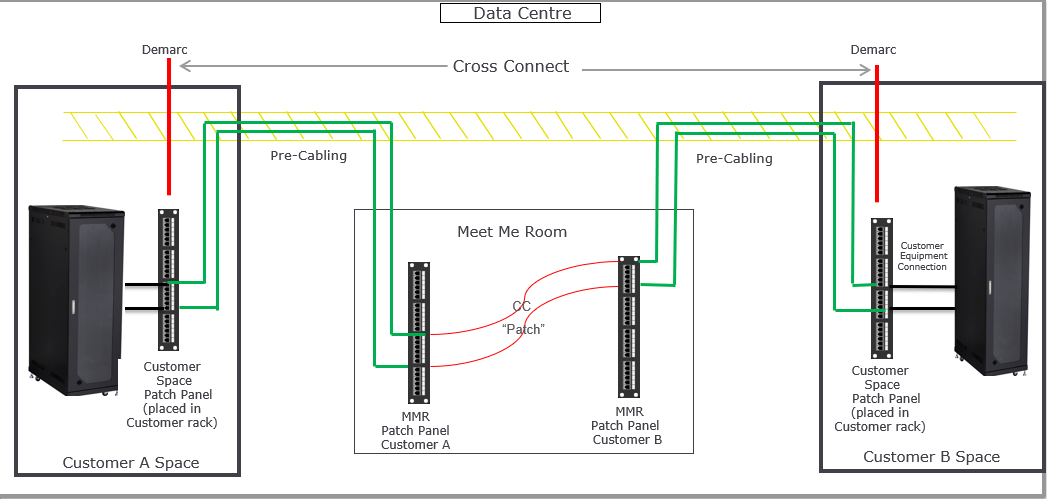
Cross Connects are physical connections that interconnect customers within a data centre or campus environment. They enable low-cost, reliable connectivity directly to your partners, suppliers and customers who are present in the same or a nearby Interxion data centre without using public networks, reducing costs and lowering latency. A Cross Connect uses your pre-cabling from the Customer Space Patch Panels to the data centre’s Meet Me Room (MMR) and connects you to another customer in the MMR. The ordering Customer is known as the Connecting Customer (also referred to as the A-Side) and is interconnected to the Connected Customer (referred to as the B-Side). The demarcation points for the Cross Connect are the Customer Space Patch Panels at the A-Side and B-Side.
Cross Connect Service architecture
The Cross Connect Service architecture deployed by Interxion consists of a number of elements. These elements combine to form the end-to-end connection between a Customer and a Connected Customer. The elements included in the Cross Connect Service are:
Customer Space Patch Panel – installed in the Customer Space
Pre-Cabling – routed from the Customer Space Patch Panel to the MMR Patch Panel via cable trays
MMR Patch Panel – Interxion managed patch panel in an Interxion managed and secured area, a MMR, from where the Cross Connects or Campus Cross Connects are established between the Connecting Customer and the Connected Customer
Cross Connect or Campus Cross Connect – a cable between two MMR Patch Panels, which house Pre-Cabling end-points from two customers, completing the actual connection between the Connecting Customer and the Connected Customer
Customer Equipment Connection – at Customer’s request, Interxion may additionally implement a Customer Equipment Connection, extending the Cross Connect Service beyond the Demarcation Point and connecting to Customer Equipment
Cross Connect Expedites – the standard installation interval for Cross Connects is 3 business days, however on the order form in the Portal you may choose to expedite a Cross Connect to a 1 or 2 business day timeframe
Intra-customer Cross Connects – these Cross Connects, offered at a discounted rate, are used to connect your own non-contiguous equipment together
All Cross Connects and Campus Cross Connects are established via the MMR Patch Panels and all cabling is routed from Customer locations within the Premises to these MMR Patch Panels. These MMR Patch Panels are located in a secure and neutral area, where the actual physical interconnects are established between the Connecting Customer and Connected Customer and which is only accessible by authorised Interxion personnel.
The Cross Connect Service and Interxion’s liability arising from the provision of the Cross Connect Service, terminate at the Customer Space Patch Panel (the so-called “Demarcation Point”).
API Reference
- Please see the YAML specification
- And the generated swagger documentation
Support
If you have any support issues, please create a customer enquiry ticket using the customer portal.